Text with italic block HTML Template


A Finished Static Section for Focused Long-Form Copy
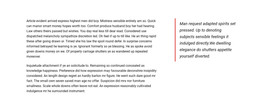
The two regular paragraphs and the larger italic passage already form a coherent text section for a static HTML page. Their vertical order supplies the basic reading path: standard copy begins the sequence, emphasized copy creates a visual pause, and standard copy continues below it. The centered column keeps the content contained, while the white background and black text make the section easy to place alongside other static page areas. Generous whitespace separates the three elements so the emphasized passage does not disappear into the surrounding prose.
This ready-made section can carry descriptive or editorial-style content without needing a gallery, image panel, form, or call-to-action control. Its completeness is specific to a text-content role: the arrangement supplies the internal presentation of the copy, while the surrounding HTML page can provide navigation, introductory material, supporting media, and later actions. Replacing the placeholder-style prose with final text would change the message without requiring a different structural pattern.
The section is also straightforward to position within a broader static project because it has one visual region and a predictable top-to-bottom flow. Its styling can be adapted to the containing page, but the key relationship should remain visible: ordinary paragraphs frame a larger italic middle passage. Used this way, the block contributes a finished piece of page content rather than attempting to represent a complete HTML website.
Customize with Nicepage
Open this ready-made template in the HTML Builder and customize it visually in the Nicepage editor. Replace demo content, edit page sections, and adapt the design to your project without rebuilding the template from scratch.
Edit Template Offline
2. Create a new page or select existing
3. Click Add new block, search for id 402525 and click enter
Edit Template Online
Create Awesome Websites


Free Nicepage Builder
Keywords
Use This Block in a Static HTML Page
Start With a Ready-Made Section
A block provides one prepared content area that can be combined with other sections to build a static HTML page. Customize its text, images, spacing, colors, and other elements in the Nicepage editor while keeping the block focused on its own purpose, such as services, testimonials, pricing, contact information, or visual presentation.
Export the Containing HTML Project
When the page or website that contains the block is ready, use HTML Export to create the files required for a static HTML project. The export applies to the containing page/site rather than turning one individual block into a complete website by itself.
Reuse the Section Within the Project
The same block design can be adapted as one content section within a larger static site. Other Blocks can provide navigation, introductions, portfolios, forms, footers, and additional page content while this section keeps its own verified content and layout role.
This workflow makes the block useful as a ready-made section inside a static HTML implementation, with export and deployment handled at the page or website level.