Opening soon HTML Template


Edit Template Offline
2. Create new page and search for id 3406781
Edit Template Online
Create Awesome Websites


Free Nicepage Builder
Keywords
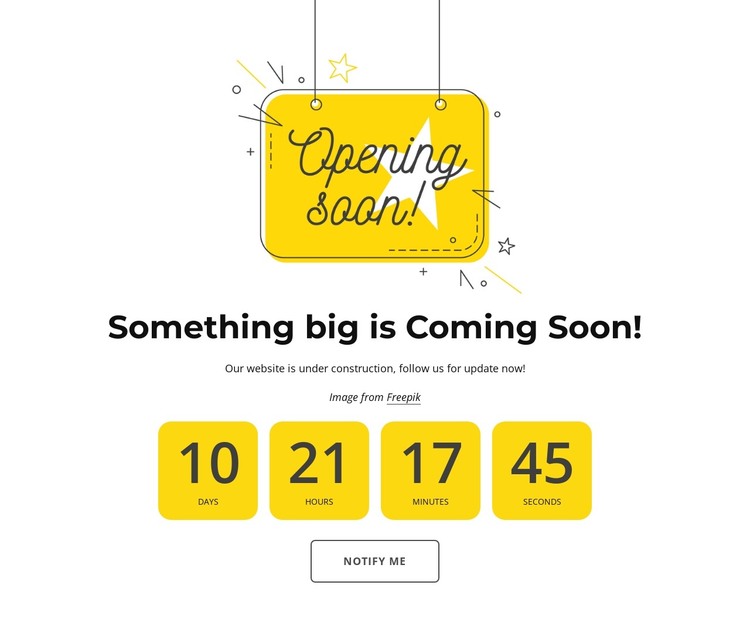
A Four-Unit Countdown Forms a Ready-Made Static Section
The opening-soon illustration, centered heading, and supporting construction message provide the explanatory layer of this section. Below them, the countdown row divides time into four visible units: days, hours, minutes, and seconds. That repeated structure gives the block a recognizable status function without requiring additional surrounding content to explain what visitors are seeing. The notification button completes the arrangement by offering a clear place for a response after the time display.
Inside a static HTML page, this block can be placed as a ready-made launch-status area between other page sections. Its centered vertical stack makes the section easy to distinguish from neighboring content, while the white background leaves room for the containing page to supply its own broader visual rhythm. The yellow rounded tiles provide the main accent, and the large bold heading creates a strong reading entry point above the smaller paragraph.
The structure is focused enough to preserve its purpose when text or imagery is adapted for the surrounding project. Other sections may handle navigation, detailed launch information, or additional contact content, while this one keeps attention on the upcoming status, the four-part timer, and the notification prompt. If the containing project is exported as static HTML, the section remains a self-contained content area within that broader implementation.
Customize with Nicepage
Open this ready-made template in the HTML Builder and customize it visually in the Nicepage editor. Replace demo content, edit page sections, and adapt the design to your project without rebuilding the template from scratch.
Export and Use This Template as an HTML Website
Create a Portable HTML Website
When the template is ready, use the HTML Export option to create a static website with the files required for deployment. The exported website can be used independently of the Nicepage editor and deployed on your preferred hosting.
Nicepage also provides SEO settings and optimization features, including Page Titles and Descriptions, Canonical settings, headings, image Alt Text, and other page-level properties that help prepare the website for search engines.
Deploy Without a CMS
Upload the finished website to the hosting environment that fits your project. Because the exported site does not require WordPress, Joomla, or another CMS to deliver its pages, it can be placed on your own server, uploaded to a hosting provider, or deployed through an existing web infrastructure.
Hand Off the Website Files
The generated website files can also be provided to a client, developer, or hosting team. They remain available outside the Nicepage editor for deployment, technical review, or project-specific development when additional work is required.
This workflow makes the template a practical foundation for a portable static website that can be exported from the Nicepage editor and deployed independently.