Smart solutions blog Html Code Example


Edit Template Offline
2. Create new page and search for id 6480098
Edit Template Online
Create Awesome Websites


Free Nicepage Builder
Keywords
Article Cards and Contact Areas Leave Room for Targeted Extensions
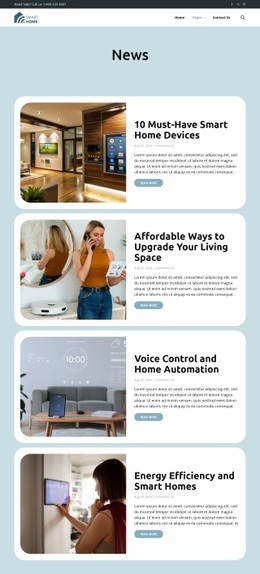
The four repeated article cards create distinct content zones where project-specific functionality could be added without disturbing the editorial presentation. Each item already separates an image, title, displayed metadata, summary, and Read More action, so an external component could be considered alongside a particular article-related area if the finished project requires capabilities beyond the visible page elements. The existing card pattern would remain the reference for width, spacing, and visual alignment.
The header offers a second set of practical integration points. It combines a phone contact, social links, logo, primary navigation, and search control across two horizontal bars. A custom search behavior, external service connection, or another project-specific element could be placed near the relevant header content when needed, but the template analysis does not show custom code already present in the design.
The footer provides another clearly defined zone through the Talk to an expert call to action, contact information, social links, quick-link columns, and service hours. This grouping could accommodate a custom booking, support, or communication component if the project requires one. Nicepage documents the HTML Element as the place for adding external code, but the important value here is the template's existing separation of article, navigation, and contact areas. That separation makes extensions easier to associate with the content they support rather than treating custom functionality as an unrelated layer.
Customize with Nicepage
Open this ready-made template in the HTML Code Generator and customize it visually in the Nicepage editor. Replace demo content, edit page sections, and adapt the design to your project without rebuilding the template from scratch.
Extend This Page With Custom HTML Code
Insert Code With the HTML Element
Use the HTML Element to add custom code directly to a Block in the Nicepage editor. Enter the required markup in the Code field when the page needs content or functionality that is not available through the standard page elements.
Place the HTML Element in the Layout
Treat the HTML Element as part of the visual page composition. Adjust its position, width, height, alignment, and margins to place the custom content where it belongs alongside text, images, buttons, and other elements. This makes it possible to combine visually edited sections with project-specific code without separating the custom element from the rest of the layout.
Add HTML, CSS, JavaScript, and External Components
The HTML Element supports HTML, CSS, and JavaScript, allowing you to extend the page with custom markup and interactive functionality. It can also be used to embed custom code and third-party components, such as social feeds, advertising code, widgets, or other external functionality required by the project.
This workflow makes the template useful for projects that need a visual page editor together with custom HTML code, JavaScript, embedded components, and functionality beyond the standard page elements.