Poke bowls Html Code Example


A Clear Extension Area Beneath the Hero Message
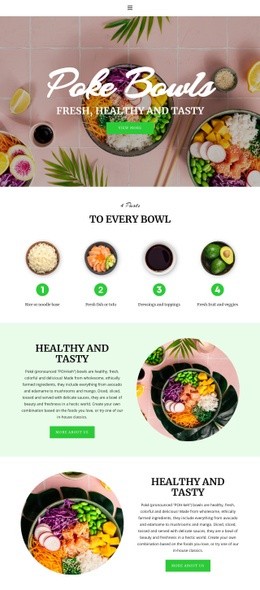
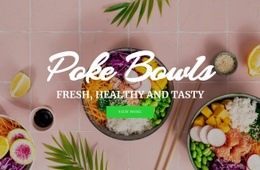
The centered heading group already gives the section a defined message: “Poke Bowls” identifies the offering, while “Fresh, Healthy and Tasty” adds its descriptive emphasis. The single “View More” button then marks the existing onward point without introducing several competing actions. Because the content is arranged as one vertical stack over a full-width food image, a project that needs extra functionality can consider the area around this message or button as an extension point rather than rebuilding the hero's core structure.
For example, custom code could support a project-specific menu link, ordering handoff, dietary information panel, or other external element if the surrounding implementation requires it. Such an addition would need to remain subordinate to the existing heading, image, overlay, and button relationship. The food photograph supplies context, while the dark shading protects the legibility of the text and keeps the center of the composition visually coherent. In an HTML Code context, the value lies in identifying where optional functionality could connect to this real content arrangement. The block itself remains a static hero section; custom markup or an external component would be a possible project extension, not an existing feature of the section.
Customize with Nicepage
Open this ready-made template in the HTML Code Generator and customize it visually in the Nicepage editor. Replace demo content, edit page sections, and adapt the design to your project without rebuilding the template from scratch.
Edit Template Offline
2. Create a new page or select existing
3. Click Add new block, search for id 6082724 and click enter
Edit Template Online
Create Awesome Websites


Free Nicepage Builder
Keywords
Extend This Page With Custom HTML Code
Insert Code With the HTML Element
Use the HTML Element to add custom code directly to a Block in the Nicepage editor. Enter the required markup in the Code field when the page needs content or functionality that is not available through the standard page elements.
Place the HTML Element in the Layout
Treat the HTML Element as part of the visual page composition. Adjust its position, width, height, alignment, and margins to place the custom content where it belongs alongside text, images, buttons, and other elements. This makes it possible to combine visually edited sections with project-specific code without separating the custom element from the rest of the layout.
Add HTML, CSS, JavaScript, and External Components
The HTML Element supports HTML, CSS, and JavaScript, allowing you to extend the page with custom markup and interactive functionality. It can also be used to embed custom code and third-party components, such as social feeds, advertising code, widgets, or other external functionality required by the project.
This workflow makes the template useful for projects that need a visual page editor together with custom HTML code, JavaScript, embedded components, and functionality beyond the standard page elements.

Design Set (15)

More from Food & Restaurant Blocks
-
-

-
-
-
-
-
-
-
-
-
Customize Any TemplateDownload
-
-
-
-
-
-
-
-
-
-


More from Text On Image Blocks
-

-
-
-
-
-
-
-
-
-
-
Customize Any TemplateDownload
-
-
-
-
-
-
-
-
-
-