Three people from the team Html Code Example


Profile Regions Leave Clear Space for Section-Level Extensions
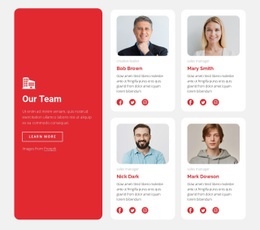
The three cards already establish distinct content regions for each team profile. A portrait introduces the person visually, the role label and name identify the profile, the description adds context, and four social icons provide outbound connection points. Because the same sequence is repeated across all three cards, a project-specific extension can be associated with the relevant profile without confusing one person’s information with another’s.
The horizontal row and centered stacking also make the boundaries of the existing content easy to understand. The pale blue center card is a visual emphasis only; it does not change the profile’s content model or create a separate interaction pattern. If a project requires custom markup, an external profile link, a directory reference, or another small integration, the logical place would be beside the appropriate card content or social-link region rather than replacing the portrait, description, or repeated card structure. This HTML Code interpretation concerns potential functionality around the real team section. It does not assume that custom JavaScript, widgets, or external integrations are already present in the block. Any addition should preserve the repeated card boundaries so the new function remains associated with the intended profile and does not disrupt the shared horizontal rhythm.
Customize with Nicepage
Open this ready-made template in the HTML Code Generator and customize it visually in the Nicepage editor. Replace demo content, edit page sections, and adapt the design to your project without rebuilding the template from scratch.
Edit Template Offline
2. Create a new page or select existing
3. Click Add new block, search for id 471844 and click enter
Edit Template Online
Create Awesome Websites


Free Nicepage Builder
Keywords
Extend This Page With Custom HTML Code
Insert Code With the HTML Element
Use the HTML Element to add custom code directly to a Block in the Nicepage editor. Enter the required markup in the Code field when the page needs content or functionality that is not available through the standard page elements.
Place the HTML Element in the Layout
Treat the HTML Element as part of the visual page composition. Adjust its position, width, height, alignment, and margins to place the custom content where it belongs alongside text, images, buttons, and other elements. This makes it possible to combine visually edited sections with project-specific code without separating the custom element from the rest of the layout.
Add HTML, CSS, JavaScript, and External Components
The HTML Element supports HTML, CSS, and JavaScript, allowing you to extend the page with custom markup and interactive functionality. It can also be used to embed custom code and third-party components, such as social feeds, advertising code, widgets, or other external functionality required by the project.
This workflow makes the template useful for projects that need a visual page editor together with custom HTML code, JavaScript, embedded components, and functionality beyond the standard page elements.