Rock climbing wedding Html Code Example


Edit Template Offline
2. Create new page and search for id 16681
Edit Template Online
Create Awesome Websites


Free Nicepage Builder
Keywords
Cliffside stories create clear places for custom extensions
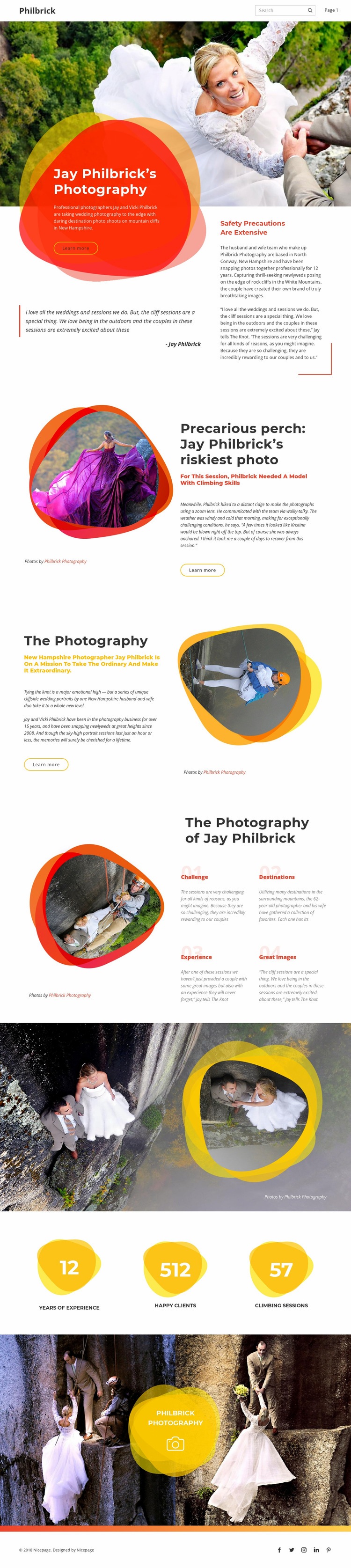
The opening hero combines a large wedding photograph, an overlaid color panel, introductory copy, and a safety-focused supporting message. That combination creates a defined content zone for the existing brand introduction while leaving the surrounding visual composition intact. The following split section adds a featured story about Jay Philbrick’s riskiest photo and the climbing ability required for the session, giving the page a natural location for project-specific media or an external storytelling component if the final site needs one.
The four labeled feature blocks—challenge, destinations, experience, and Great Images—offer another useful set of integration points. Their compact format could remain the visual summary while additional custom content is placed beside or within the relevant theme. The three metric panels and paired closing photographs also divide the page into recognizable areas: evidence, visual proof, and a final brand impression. Because the template already uses navigation, mobile navigation, counters, and social links, custom HTML or a third-party component should supplement a specific content area rather than replace the page’s established sequence. The design therefore supports targeted extension around its photography stories, feature themes, metrics, or social presence without claiming that custom code is already included.
Customize with Nicepage
Open this ready-made template in the HTML Code Generator and customize it visually in the Nicepage editor. Replace demo content, edit page sections, and adapt the design to your project without rebuilding the template from scratch.
Extend This Page With Custom HTML Code
Insert Code With the HTML Element
Use the HTML Element to add custom code directly to a Block in the Nicepage editor. Enter the required markup in the Code field when the page needs content or functionality that is not available through the standard page elements.
Place the HTML Element in the Layout
Treat the HTML Element as part of the visual page composition. Adjust its position, width, height, alignment, and margins to place the custom content where it belongs alongside text, images, buttons, and other elements. This makes it possible to combine visually edited sections with project-specific code without separating the custom element from the rest of the layout.
Add HTML, CSS, JavaScript, and External Components
The HTML Element supports HTML, CSS, and JavaScript, allowing you to extend the page with custom markup and interactive functionality. It can also be used to embed custom code and third-party components, such as social feeds, advertising code, widgets, or other external functionality required by the project.
This workflow makes the template useful for projects that need a visual page editor together with custom HTML code, JavaScript, embedded components, and functionality beyond the standard page elements.