Contact form and text group HTML5 Template


The Rounded Panel and Form Define the Internal Hierarchy
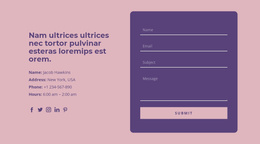
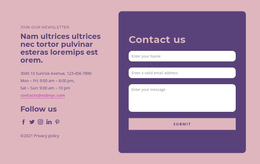
The block’s internal organization begins with two adjacent columns that have distinct content roles. The left column is a rounded information panel. Its heading and supporting contact context establish an informational group, followed by five social icon links and a privacy label. The right column forms a separate interaction group: “Contact us” introduces three required input areas, which are stacked vertically and resolved by a full-width Submit control. This arrangement makes the relationship between context and response easy to follow inside the section.
The hierarchy is not a page-wide sequence. It is the organization of one reusable contact block, with the panel and form acting as its primary regions. The muted pink background unifies those regions, while the dark purple panel, headings, and button provide visual markers that distinguish the information group from the input group. Generous spacing in the form keeps each field readable and preserves the vertical progression toward submission.
In Nicepage, the Layers panel can help inspect Containers, Elements, and nested content groups within a block. For this layout, the useful structural view is the relationship between the rounded information region, the social-link group, and the form hierarchy, rather than any structure outside the section.
Customize with Nicepage
Open this ready-made template in the HTML5 Template Builder and customize it visually in the Nicepage editor. Replace demo content, edit page sections, and adapt the design to your project without rebuilding the template from scratch.
Edit Template Offline
2. Create a new page or select existing
3. Click Add new block, search for id 480950 and click enter
Edit Template Online
Create Awesome Websites


Free Nicepage Builder
Keywords
Explore the Structure of This HTML5 Block
Inspect the Block Hierarchy
Use the Layers panel to inspect the hierarchy of the block, including its Containers, Elements, repeated content groups, and nested items. For a reusable section, the useful structural question is how the content inside the block is organized, not how an entire website is arranged from Header to Footer.
Work With Organized Content Groups
A block can combine headings, text, images, buttons, grids, lists, forms, or other elements inside one structured section. Keeping those relationships visible makes it easier to select, rename, hide, lock, or reorganize parts of a more complex layout without losing the intended content hierarchy.
Extend the Structure Carefully
If a project later needs an extra content element or custom integration, the internal hierarchy can be inspected before changes are made. This helps preserve the relationship between the block's existing elements while the section is adapted to the needs of the containing page.
This workflow treats the design as an HTML5-oriented section with a clear internal organization, while page-level navigation, Header, Footer, and other site structure remain outside the block unless they are explicitly part of the section itself.