Headlne and list HTML5 Template


Heading, Service Group, and Action Form One Internal Hierarchy
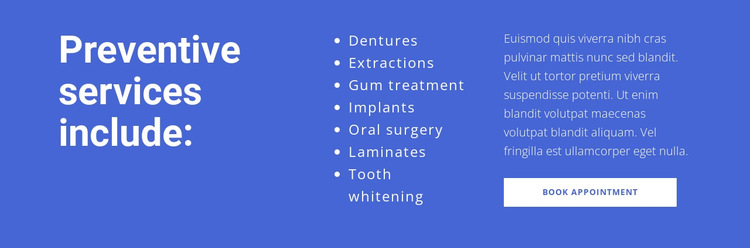
The block’s internal organization begins with an introductory heading on the left: “Preventive services include:”. The seven service names then form a repeated content group in the center, containing dentures, extractions, gum treatment, implants, oral surgery, laminates, and tooth whitening. On the right, supporting copy creates a separate explanatory group, followed by the Book Appointment button as the section’s action element. These relationships establish a progression from subject, to offerings, to response.
The three columns are not interchangeable text areas. The heading identifies the subject of the block, the centered list carries the scannable service information, and the right-side content gives the visitor context before the appointment action. The blue full-width background acts as the shared container for all three groups, while the white text keeps their hierarchy consistent across the section. Generous horizontal spacing further clarifies the boundaries between the groups without splitting them into separate blocks.
For an HTML5 Template interpretation, the value lies in this existing organization inside the section. The block has a recognizable hierarchy of introductory content, repeated service content, supporting text, and action, while broader page structure remains outside the reusable component.
Customize with Nicepage
Open this ready-made template in the HTML5 Template Builder and customize it visually in the Nicepage editor. Replace demo content, edit page sections, and adapt the design to your project without rebuilding the template from scratch.
Edit Template Offline
2. Create a new page or select existing
3. Click Add new block, search for id 324439 and click enter
Edit Template Online
Create Awesome Websites


Free Nicepage Builder
Keywords
Explore This HTML5 Template Structure
Navigate the Page Structure
Customize this ready-made HTML5 template visually in the Nicepage editor while keeping its page organization easy to understand. Use the Layers panel to view the hierarchy of the Header, Blocks, Containers, Elements, and Footer, navigate between different parts of the page, and quickly select items within the layout.
The Layers panel also provides practical controls for working with more complex pages. Blocks, Containers, and Elements can be renamed for easier identification, temporarily hidden while editing, or locked to prevent accidental changes. The outline can also expose the internal structure of elements such as Menus and Contact Forms.
Work With Organized Page Sections
Blocks divide the page into major content sections, while Containers and Elements organize the content inside them. Keeping this hierarchy visible makes it easier to understand how individual parts of the page relate to one another, especially when a layout contains many nested elements.
You can use the Layers panel to move through this structure instead of selecting everything directly on the canvas, making complex layouts easier to inspect and manage as an organized page hierarchy.
Review and Extend the HTML
After customizing the page visually, the resulting HTML can be reviewed and adapted when code-level changes are required. If a project needs additional markup or functionality beyond the standard page elements, use the HTML Element to add targeted custom HTML where necessary.
This workflow combines visual editing with a clear view of the page hierarchy, making the template useful both as a ready-made design and as an HTML5 project whose structure can be inspected, managed, adapted, and extended.

Design Set (20)
-

-
-
-
-
-
-
-
Free Website Builder SoftwareDownload
-
-
-
-
-
-
-
-
-
-












More from Text Blocks
-

-
-
-
-
-
-
-
-
-
-
Free Website Builder SoftwareDownload
-
-
-
-
-
-
-
-
-
-