
10 Years of Style Template


Edit Template Offline
2. Create new page and search for id 6548896
Edit Template Online
Create Awesome Websites


Free Nicepage Builder
Keywords
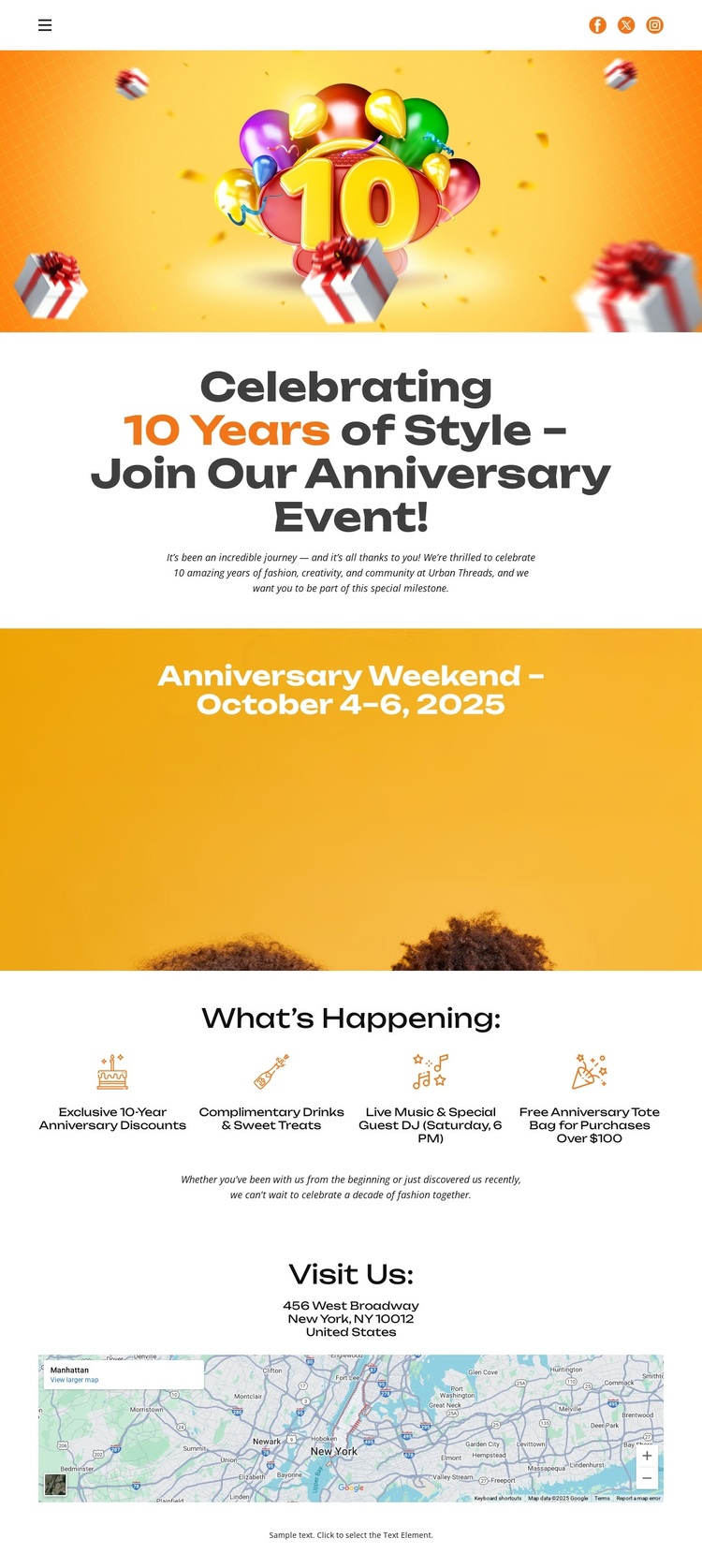
Balloon Artwork and Four Highlights Give the Celebration a Clear Identity
Balloon artwork, bright yellow and orange color fields, and the large “10 Years of Style” announcement make the subject of this design immediately recognizable. The page is not built around a generic service list or a dense corporate introduction; it uses a festive visual opening to establish an anniversary event and invite visitors into the occasion. Rounded display typography and centered alignment reinforce that celebratory direction throughout the first impression.
The separate date banner strengthens the choice by giving the October 4–6, 2025 weekend a prominent place in the composition. Below it, the What’s Happening section adds four compact reasons to understand the event more fully: the exclusive anniversary gathering, complimentary drinks and gourmet treats, live music with a special guest performance, and a tote-bag promotion. The four-item arrangement provides enough content variety to make the page informative without losing its single-event focus.
A venue map in the Visit Us section completes the design’s practical coverage. It changes the page from a purely decorative announcement into an invitation that also addresses where visitors should go. This combination of celebratory imagery, a strong date treatment, concise activity information, and location guidance makes the template worth choosing for anniversary promotions, retail celebrations, or comparable event announcements that need visual energy and straightforward attendance details in one page.
Customize with Nicepage
Open this ready-made template in the Template Builder and customize it visually in the Nicepage editor. Replace demo content, edit page sections, and adapt the design to your project without rebuilding the template from scratch.
Start With a Ready-Made Template
Choose a Design for a New Page
Use a ready-made template as a starting point instead of creating every page from a blank canvas. When adding a new page in Nicepage, browse available designs, compare different layouts, and choose an option that already fits the general purpose and visual direction of your project.
Browse Different Page Designs
Explore Page Designs using search, thematic categories, Design Sets, and full-page previews. The collection includes layouts for different subjects and page purposes, making it easier to compare alternatives before selecting a design to customize.
Customize the Selected Template
After choosing a design, create the page and continue editing it visually in Nicepage. Replace the demo content, adjust images, typography, colors, sections, and other elements, and adapt the ready-made layout to your own content instead of rebuilding the design from the beginning.
Explore More Design Directions
If the first option does not match your project closely enough, return to the design collection and compare other templates before committing to a layout. This makes the template library useful not only for faster page creation, but also for exploring different visual approaches and finding a suitable starting point for a new project.
This workflow gives you access to a broad collection of ready-made designs that can be selected, compared, and customized according to the needs of each new page or project.
