
Elegance in Every Bottle Template


Edit Template Offline
2. Create new page and search for id 6546089
Edit Template Online
Create Awesome Websites


Free Nicepage Builder
Keywords
Five Scent Categories Give the Collection a Clear Starting Point
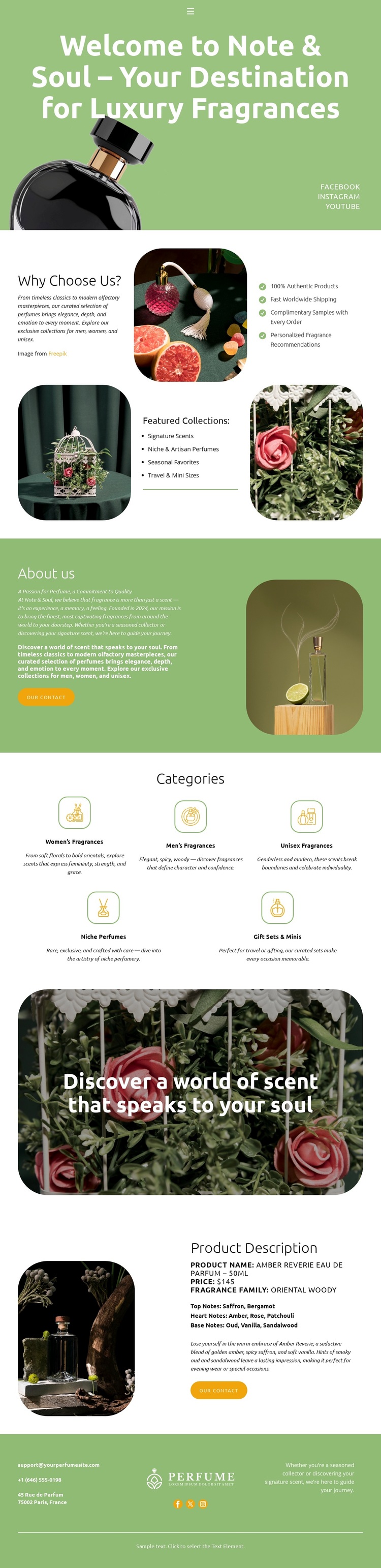
The five category cards make this design a useful choice for a fragrance project that needs shoppers to recognize the range quickly. Women Fragrances, Men Fragrances, Unisex Fragrances, Kids Perfumes, and Gift Sets & Minis are presented as distinct destinations within the same visual system, giving the collection breadth without making the opening page feel dense. The compact two-row grid also creates a strong pause between the brand story and the more promotional sections that follow.
The surrounding content adds several different reasons to choose this layout. The hero introduces Note & Soul through a centered welcome message and perfume imagery, while the Why Choose Us? area combines short copy, a benefits checklist, and featured collection photographs. A tall product image supports the About section, and the rounded botanical banner changes the mood toward personal scent discovery. Near the end, the Amber River Eau de Parfum block turns that atmosphere into a concrete product presentation with a fragrance-family label, price display, descriptive text, and purchase action. This combination suits a luxury perfume collection or gift-oriented shop that wants visual mood, category coverage, and a featured product to work together rather than relying on a product grid alone. The footer’s wordmark, contact details, and social references reinforce the brand presentation without competing with the collection.
Customize with Nicepage
Open this ready-made template in the Template Builder and customize it visually in the Nicepage editor. Replace demo content, edit page sections, and adapt the design to your project without rebuilding the template from scratch.
Start With a Ready-Made Template
Choose a Design for a New Page
Use a ready-made template as a starting point instead of creating every page from a blank canvas. When adding a new page in Nicepage, browse available designs, compare different layouts, and choose an option that already fits the general purpose and visual direction of your project.
Browse Different Page Designs
Explore Page Designs using search, thematic categories, Design Sets, and full-page previews. The collection includes layouts for different subjects and page purposes, making it easier to compare alternatives before selecting a design to customize.
Customize the Selected Template
After choosing a design, create the page and continue editing it visually in Nicepage. Replace the demo content, adjust images, typography, colors, sections, and other elements, and adapt the ready-made layout to your own content instead of rebuilding the design from the beginning.
Explore More Design Directions
If the first option does not match your project closely enough, return to the design collection and compare other templates before committing to a layout. This makes the template library useful not only for faster page creation, but also for exploring different visual approaches and finding a suitable starting point for a new project.
This workflow gives you access to a broad collection of ready-made designs that can be selected, compared, and customized according to the needs of each new page or project.
