Menu Does Not Display


Hi,
I've asked our developers to check the issue with exporting from Nicepahe Online.
We'll let you know when we receive any news from them.
...................................................
Sincerely,
Olivia
Nicepage Support Team
Please subscribe to our YouTube channel: http://youtube.com/nicepage?sub_confirmation=1
Follow us on Facebook: http://facebook.com/nicepageapp

NEVERMIND.... hey "roberts.trevor" try the following... (it works).
To see the menu, you need to set it up in the wordpress admin side.
Go to Appearance -> Menus You should see a "Manage Locations" tab.
Select it. You should see your "Main Menu" location.
Choose the menu that you created there.
Select Save Changes.
Best.
Hi,
The initial problem was in our Online Editor ( https://nicepage.com/Editor/Siteboard/#/dashboard) and it is fixed by our developers.
In WordPress, the menu is controlled by WP. Therefore you can customize the menu and change menu items under the WP Appearance >> Menus. The menu style can be changed in Nicepage plugin.
...................................................
Sincerely,
Susanna I.
Nicepage Support Team
Please subscribe to our YouTube channel: http://youtube.com/nicepage?sub_confirmation=1
Follow us on Facebook: http://facebook.com/nicepageapp

I´ve got the same issue. I use Nicepage on Joomla and in the editor the menu is visible, but on the actual page it is not displayed.

I´ve got the same issue. I use Nicepage on Joomla and in the editor the menu is visible, but on the actual page it is not displayed.

Seems to work fine with the nicepage online editor. Problem still exists in the joomla nicepage plugin.
Tested on:
Debian v10.7
PHP v7.3.19-1
Joomla! v3.9.23
Nicepage v3.3.3
In editing mode all fine. In preview mode the menu does not exist anymore, not even in the source code of the displayed page.
Interesting to say that the same issue happens to be when exporting theme and content from the nicepage app and import it into the extension.
Maybe it is worth to mention that I can add a simple image logo to the header which is displayed correctly in preview but when I add a normal text or citation it does not show, except I move it into the main block.
Last edited 30 December 2020 by danielpiater
Daniel,
Please create a separate private case, providing project and temporary access to your website.
...................................................
Sincerely,
Allen R.
Nicepage Support Team
Please subscribe to our YouTube channel: http://youtube.com/nicepage?sub_confirmation=1
Follow us on Facebook: http://facebook.com/nicepageapp

Same issue here. The header en footer is visible in Nicepage desktop and Joomla version. But not on actual page. The header contains the menu so it is quite essential. The footer is displayed with the social media icons, but without the text in it.
How can I fix this? Please help!
Kind regards,
Inge
I also get this message: "header will not be visible on live site. Change Page Template."
I. Vermelis,
In Joomla, please open Articles -> Article Details. Make sure you are using the Nicepage Header and Footer as the template option.
...................................................
Sincerely,
Allen R.
Nicepage Support Team
Please subscribe to our YouTube channel: http://youtube.com/nicepage?sub_confirmation=1
Follow us on Facebook: http://facebook.com/nicepageapp

Buonasera, non si riesce a visualizzare il menu quando il sito è pubblicato, potete aiutarmi? P.S. il sito è stato creato online ed ho la licenza pagata.
www.alpinicaoria.it
Last edited 09 March 2021 by francesco11
Hi Francesco,
Thanks for contacting us.
Please create a separate ticket for your Topic and explain in detail your issue. On which platform is your website created, or it's plain HTML? All details would be a huge help towards the solution.
https://nicepage.com/Forum/Topic/Create?private=1.
Our team will be pleased to assist you.
...................................................
Sincerely,
Ahmad M.
Nicepage Support Team
Please subscribe to our YouTube channel: http://youtube.com/nicepage?sub_confirmation=1.
Follow us on Facebook: http://facebook.com/nicepageapp.

Hi, I'm having the same issue. I use Nicepage on Joomla and in the editor the menu is visible, but on the actual page it is not displayed. It's only displayed on the home page, if I go to any other article the menu disappears. Help please!
Hi,
Thanks for contacting us.
Check the Joomla menu if the Status to show menu is checked on all pages.
For further assistance, please create a separate ticket for your issue
https://nicepage.com/Forum/Topic/Create?private=1.
Our team will be pleased to assist you.
...................................................
Sincerely,
Ahmad M.
Nicepage Support Team
Please subscribe to our YouTube channel: http://youtube.com/nicepage?sub_confirmation=1.
Follow us on Facebook: http://facebook.com/nicepageapp.

Hi, I'm having the same issue. I use Nicepage on Joomla, and in the editor, the menu is visible, but the actual website does not show it. If I look at the Joomla menu section, the menu that Nicepage creates is not showing.
Hi Tomas,
Thanks for contacting us.
Please check, if for your menu selected the right position "hmenu", and make sure you choose that on the active template.
If your actual website still doesn't show the menu, please create a separate private ticket and provide us temporary access to the backend admin panel.
https://nicepage.com/Forum/Topic/Create?private=1.
Thank you.
...................................................
Sincerely,
Ahmad M.
Nicepage Support Team
Please subscribe to our YouTube channel: http://youtube.com/nicepage?sub_confirmation=1.
Follow us on Facebook: http://facebook.com/nicepageapp.

Hi, I'm having the same issue. I use Nicepage on Joomla, and in the editor, the menu is visible, but the actual website does not show it. If I look at the Joomla menu section, the menu that Nicepage creates is not showing.
Also do not have the "hmenu" position in the dropdown selection.
Last edited 28 August 2021 by tom.hofer74

Hello,
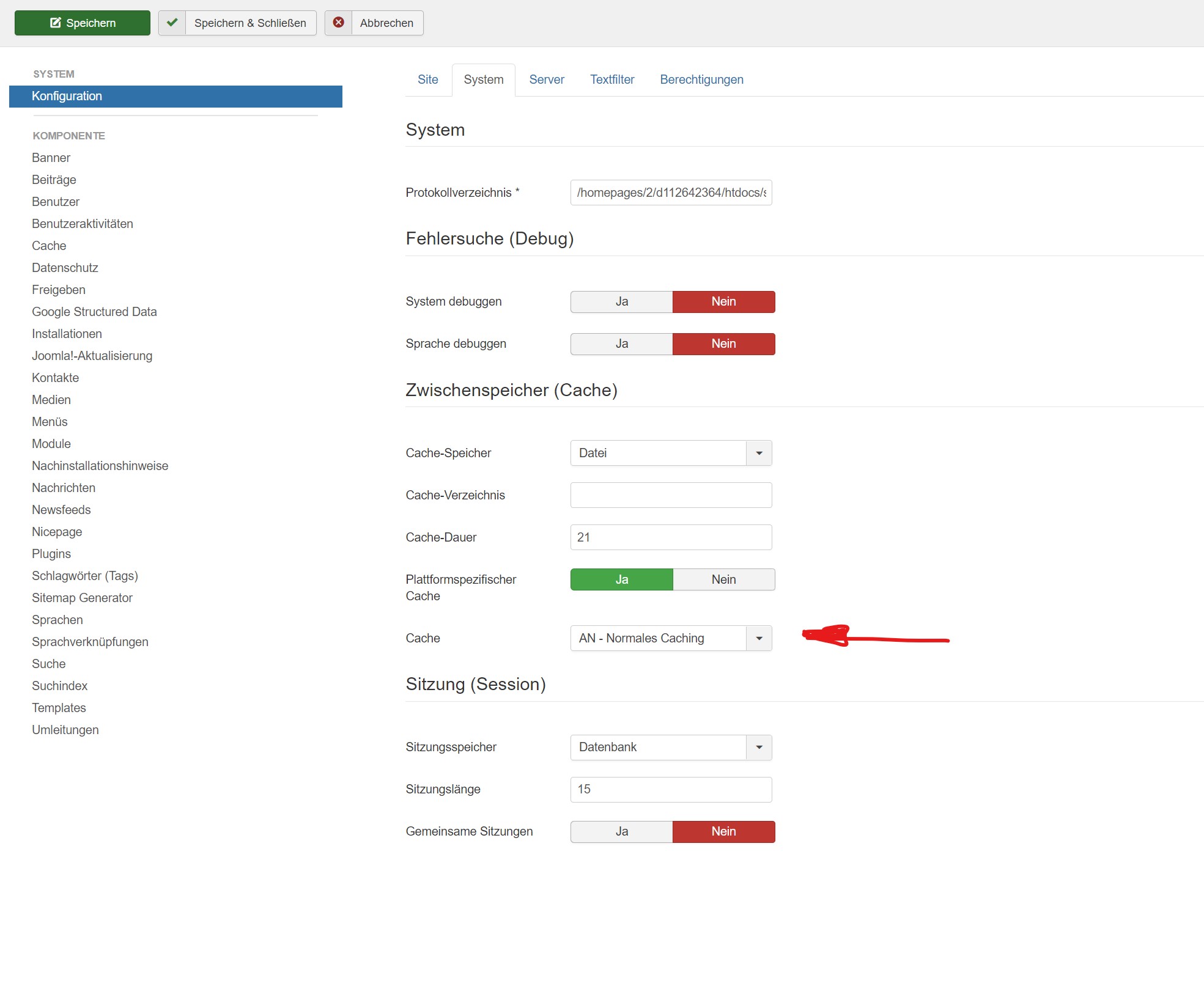
please check your cache settings. The menu disappears with extended caching.