Our home repair specialists Web Page Design


A Centered Heading Anchors the Four-by-Two Profile Composition
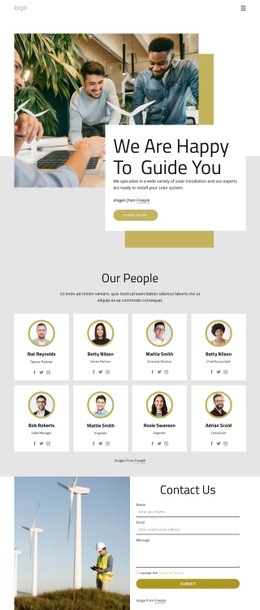
The block creates a clear page-composition unit by placing the “Home repair specialists” heading above a dense portrait grid. The heading gives visitors an immediate entry point, while the eight cards below distribute the team information evenly across four columns and two rows. This arrangement creates a strong horizontal rhythm and lets the section communicate group scale quickly, making it suitable for a team or staff area between other content sections on one webpage.
The portraits carry most of the visual detail, but the dark translucent overlays prevent the names and roles from becoming detached captions. White text inside each lower overlay keeps the profile information close to the relevant image and creates a repeated horizontal baseline across the cards. The result is a balanced relationship between visual recognition and readable labeling: the images attract attention, while the overlays provide the identifying context needed to scan the group.
The compact spacing gives the block a gallery-like density without changing its team purpose. On a broader page, that density can provide a focused transition from service or company information into a more personal presentation of the people associated with the work. The white background helps the section remain visually distinct without competing with neighboring backgrounds or page-level composition. The included Freepik credit line sits within the block's content boundary and completes the section's prepared arrangement.
Customize with Nicepage
Open this ready-made template in the Web Page Design Builder and customize it visually in the Nicepage editor. Replace demo content, edit page sections, and adapt the design to your project without rebuilding the template from scratch.
Edit Template Offline
2. Create a new page or select existing
3. Click Add new block, search for id 4735050 and click enter
Edit Template Online
Create Awesome Websites


Free Nicepage Builder
Keywords
Design a Web Page With This Block as One Section
Place the Block in the Page Composition
Use Block Designs to combine individual sections into a complete page. The analyzed block contributes one part of that composition, while other sections can handle the introduction, services, proof, portfolio, pricing, contact, or other page-level needs.
Refine the Elements Inside the Block
Use Web Page Elements such as Text, Image, Hyperlink, Grid, Gallery, and other elements to refine the section's content. Adjust the existing elements without assuming that one block must carry the entire page structure.
Balance the Section With Neighboring Content
After the block is placed, refine its spacing, image scale, text density, alignment, and background treatment so the transition into and out of the section feels intentional. Reorder Blocks at the page level when necessary while keeping the internal composition of each section coherent.
This workflow treats the block as one compositional unit in a web page: internally designed, visually distinct, and coordinated with the sections around it.