Modern Korean Skincare One Page Template


Edit Template Offline
2. Create new page and search for id 6672116
Edit Template Online
Create Awesome Websites


Free Nicepage Builder
Keywords
Categories, Routine, and Contact Form a Continuous Store Journey
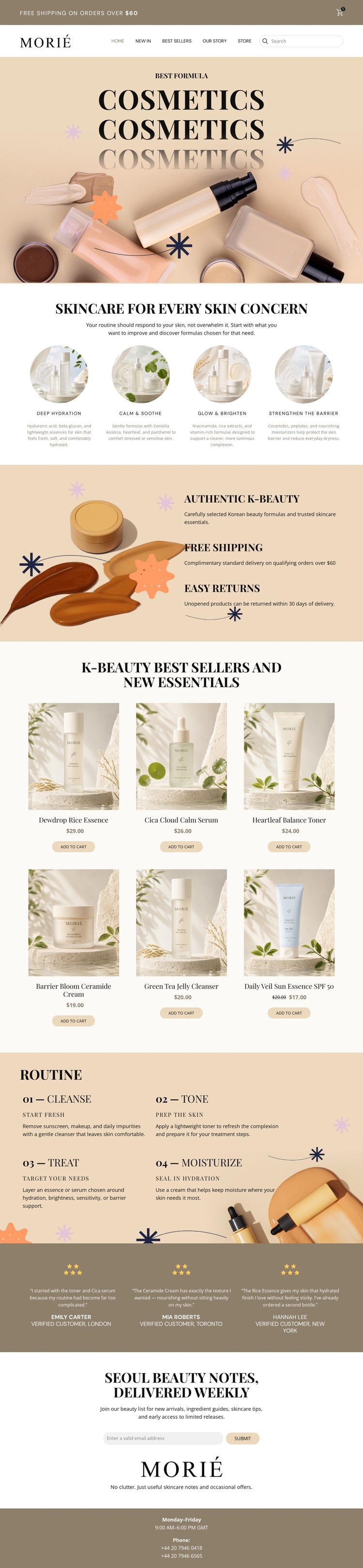
The storefront’s sections create several meaningful stops within one continuous document. The top announcement and Morié navigation establish the store context, then the cosmetics hero introduces the visual message before the four concern categories divide the subject into recognizable skincare needs. This gives visitors a reason to move beyond the opening image and explore the page in stages rather than treating it as one uninterrupted product panel.
The central sequence progresses from brand benefits to the six-product catalog, where each card combines product information, price, and an add-to-cart action. The following routine section changes the visitor’s focus from selection to use: Cleanse, Tone, Treat, and Moisturize become four numbered content destinations that explain an order of care beside product imagery. That relationship supports exploration of several content topics without requiring separate URLs.
The three testimonial entries add a later proof section, and the newsletter area provides a final subscription destination before the footer. The closing Morié block includes business hours and two phone numbers, giving the continuous page a practical endpoint. The design can therefore be read as a navigable sequence of store context, concern categories, products, routine education, reassurance, subscription, and contact information, with each section contributing a different part of the same one-page experience.
Customize with Nicepage
Open this ready-made template in the One Page Template Builder and customize it visually in the Nicepage editor. Replace demo content, edit page sections, and adapt the design to your project without rebuilding the template from scratch.
Build a Navigable One-Page Website
Connect the Menu to Page Sections
Organize the website as a sequence of sections on a single page and use the Menu For One-Page Site to connect menu items with individual page Blocks. Visitors can jump directly to sections such as About, Services, Testimonials, or Contact without opening separate pages.
Keep the Website on One URL
A one-page template can combine several parts of a small website within one continuous page. Arrange the Header, introduction, services, portfolio, company information, reviews, contact details, and other relevant sections in the order that fits the project while keeping them accessible through the same page navigation.
Make Long Pages Easier to Navigate
For longer one-page websites, keep navigation labels short and connected to meaningful sections so visitors can move through the page without relying only on scrolling. You can also use the Back To Top element to provide a quick way back to the beginning after longer sections.
This workflow makes the template suitable for compact websites that need several distinct content sections while keeping the complete visitor experience on one URL.