
Business Offline Page One Page Template


Edit Template Offline
2. Create new page and search for id 6658593
Edit Template Online
Create Awesome Websites


Free Nicepage Builder
Keywords
A Short Sequence From Workspace Status to Saved-Content Destinations
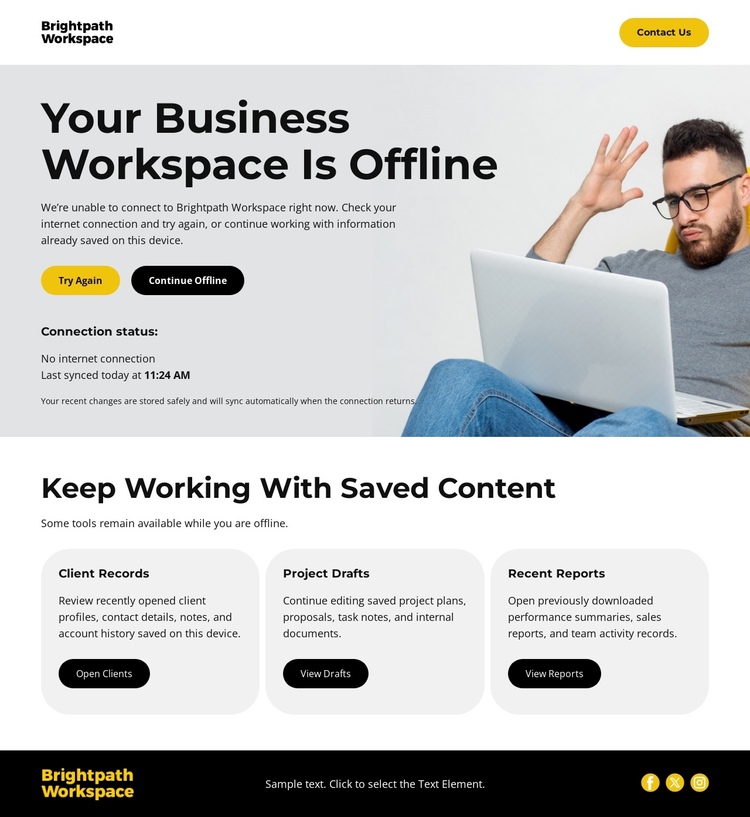
The page is arranged as a concise content journey that can be understood without leaving the document. Visitors first encounter the workspace identity and Contact Us action, then move into the central offline-status section. That section contains the immediate information needed to interpret the interruption: the offline heading, connection status, last-synced reference, and the two available choices, Try Again and Continue Offline.
After the recovery decision, the page shifts into a different content role. The Keep Working With Saved Content section introduces three distinct destinations through Recent Records, Project Drafts, and Recent Reports. Their repeated cards make the lower part of the page easy to scan while preserving differences between the types of saved material. This is a navigation-oriented sequence because several related information areas appear within the same continuous experience, not because the page claims a specific anchor setup.
The footer provides a final shared region with branding, utility text, and three circular icons. Together, the sections create a complete one-page flow: identify the workspace, understand its connection state, select a recovery direction, review saved categories, and reach the closing utilities. The sequence remains compact enough for a status page while still giving each content group a meaningful place.
Customize with Nicepage
Open this ready-made template in the One Page Template Builder and customize it visually in the Nicepage editor. Replace demo content, edit page sections, and adapt the design to your project without rebuilding the template from scratch.
Build a Navigable One-Page Website
Connect the Menu to Page Sections
Organize the website as a sequence of sections on a single page and use the Menu For One-Page Site to connect menu items with individual page Blocks. Visitors can jump directly to sections such as About, Services, Testimonials, or Contact without opening separate pages.
Keep the Website on One URL
A one-page template can combine several parts of a small website within one continuous page. Arrange the Header, introduction, services, portfolio, company information, reviews, contact details, and other relevant sections in the order that fits the project while keeping them accessible through the same page navigation.
Make Long Pages Easier to Navigate
For longer one-page websites, keep navigation labels short and connected to meaningful sections so visitors can move through the page without relying only on scrolling. You can also use the Back To Top element to provide a quick way back to the beginning after longer sections.
This workflow makes the template suitable for compact websites that need several distinct content sections while keeping the complete visitor experience on one URL.
