
Offline Page Website One Page Template


Edit Template Offline
2. Create new page and search for id 6658534
Edit Template Online
Create Awesome Websites


Free Nicepage Builder
Keywords
A Short Section Sequence Keeps Status and Support on One Page
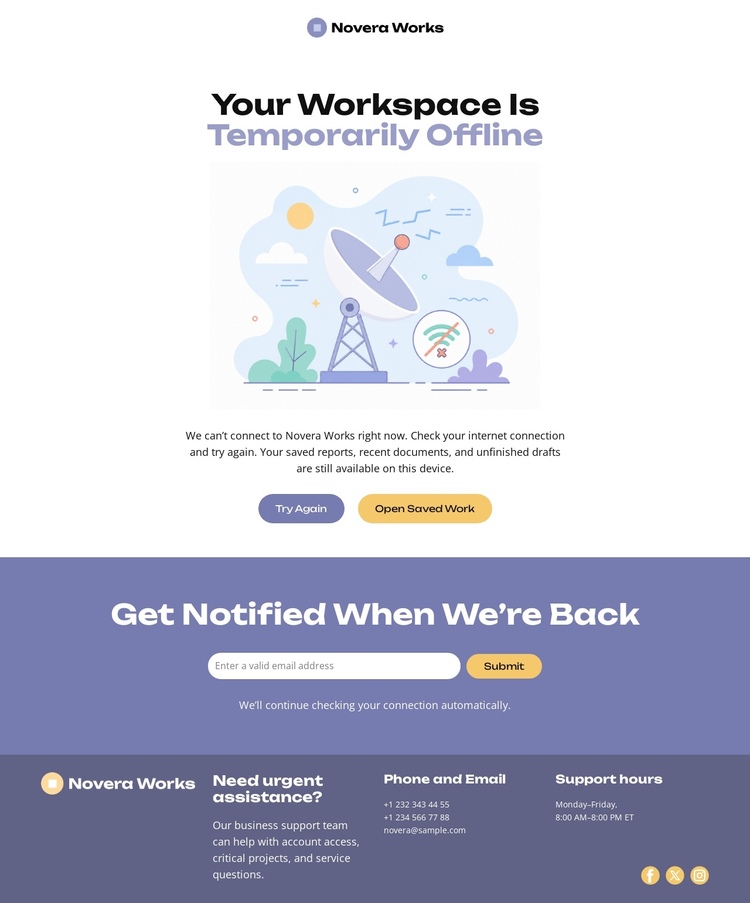
The page’s sections form a natural one-page journey because each destination answers a different question in sequence. The opening brand mark identifies the service, and the central outage area explains the current workspace status before presenting Try Again and Open Saved Work. Visitors can therefore move from recognition to immediate recovery without leaving the document. The notification block follows with a separate purpose: it gives people who cannot continue now a way to request information when service returns.
The footer acts as the final destination for support and reference details. Its dark lavender band separates the closing content from the pale main experience, while compact columns provide urgent-assistance wording, phone and email channels, support hours, and social icons. This order gives the page several meaningful regions even though the design remains brief: identity, outage status, recovery, future notification, and direct support.
That structure suits a one-page implementation because the entire response can be understood through a continuous scroll. The page does not need to distribute the notice, signup, and support information across separate URLs to make their roles clear. Instead, the visitor receives the explanation first, sees the available actions, encounters the return-notification option, and reaches contact details at the end of the same focused document.
Customize with Nicepage
Open this ready-made template in the One Page Template Builder and customize it visually in the Nicepage editor. Replace demo content, edit page sections, and adapt the design to your project without rebuilding the template from scratch.
Build a Navigable One-Page Website
Connect the Menu to Page Sections
Organize the website as a sequence of sections on a single page and use the Menu For One-Page Site to connect menu items with individual page Blocks. Visitors can jump directly to sections such as About, Services, Testimonials, or Contact without opening separate pages.
Keep the Website on One URL
A one-page template can combine several parts of a small website within one continuous page. Arrange the Header, introduction, services, portfolio, company information, reviews, contact details, and other relevant sections in the order that fits the project while keeping them accessible through the same page navigation.
Make Long Pages Easier to Navigate
For longer one-page websites, keep navigation labels short and connected to meaningful sections so visitors can move through the page without relying only on scrolling. You can also use the Back To Top element to provide a quick way back to the beginning after longer sections.
This workflow makes the template suitable for compact websites that need several distinct content sections while keeping the complete visitor experience on one URL.
