Water Bottles One Page Template



Edit Template Offline
2. Create new page and search for id 17584
Edit Template Online
Create Awesome Websites


Free Nicepage Builder
Keywords
Nine Sections Create a Continuous Bottle-Discovery Journey
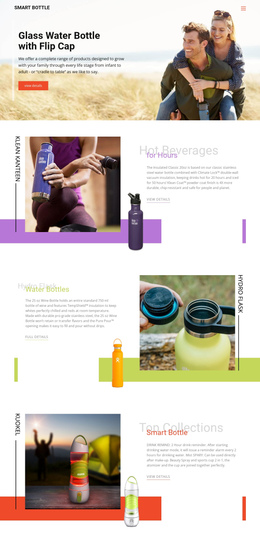
The page has a clear progression from introduction to collection. The first text-on-image block presents the glass bottle with a flip cap, then four split sections give insulated, wine, smart, and stainless steel bottles separate destinations within the same document. Their alternating image-and-text treatment changes the visual rhythm while keeping each category recognizable. The “Find the Bottle for any adventure” section then acts as a short transition into the product collection.
The four-item grid supplies another set of meaningful destinations without requiring a separate page for every featured entry. Hydro Flask, Stainless Steel Bottle, Insulated Growler 64oz, and 32oz Wide Mouth Water Bottle each receive a compact presentation with imagery, description, and a detail link. The wide collection banner and centered dark footer close the document after visitors have moved through the principal product areas.
This sequence supports a one-page information architecture because several distinct content subjects remain accessible within one continuous experience: materials, beverage use, smart functionality, outdoor context, and featured products. The navigation component can therefore point visitors toward the relevant sections rather than forcing the catalog into an assumed multi-page structure. The page’s value here is not a single action alone; it is the way multiple bottle categories and collection entries can be explored in order while the visual context stays consistent.
Customize with Nicepage
Open this ready-made template in the One Page Template Builder and customize it visually in the Nicepage editor. Replace demo content, edit page sections, and adapt the design to your project without rebuilding the template from scratch.
Build a Navigable One-Page Website
Connect the Menu to Page Sections
Organize the website as a sequence of sections on a single page and use the Menu For One-Page Site to connect menu items with individual page Blocks. Visitors can jump directly to sections such as About, Services, Testimonials, or Contact without opening separate pages.
Keep the Website on One URL
A one-page template can combine several parts of a small website within one continuous page. Arrange the Header, introduction, services, portfolio, company information, reviews, contact details, and other relevant sections in the order that fits the project while keeping them accessible through the same page navigation.
Make Long Pages Easier to Navigate
For longer one-page websites, keep navigation labels short and connected to meaningful sections so visitors can move through the page without relying only on scrolling. You can also use the Back To Top element to provide a quick way back to the beginning after longer sections.
This workflow makes the template suitable for compact websites that need several distinct content sections while keeping the complete visitor experience on one URL.