Text in different forms HTML Template


A Fundraising Introduction Ready for Static HTML Placement
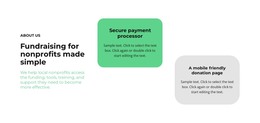
The left text column gives this section a defined introductory purpose through the heading “Fundraising for nonprofits made simple,” an eyebrow label, and supporting copy about local nonprofits gaining access to funding, tools, training, and support. The message is compact enough to establish context without requiring the surrounding page to supply another explanation before the feature content begins.
To the right, two rounded cards turn that introduction into a small capability summary. “Secure payment processor” and “A mobile friendly donation page” are presented as matched items, so the section can communicate two related tools without expanding into a larger feature grid. Their centered text and contrasting mint-green and light-gray fills distinguish the cards while keeping them visually connected.
Used inside a static HTML page, this block can function as a prepared nonprofit-support section between other page areas. The containing page can provide navigation, donation actions, detailed program information, or contact content, while this section retains its own topic and internal hierarchy. Because the card descriptions are placeholder copy, they are best replaced with project-specific explanations before publication. The white background, bold black typography, and muted accent color also give the surrounding static layout a straightforward visual base.
Customize with Nicepage
Open this ready-made template in the HTML Builder and customize it visually in the Nicepage editor. Replace demo content, edit page sections, and adapt the design to your project without rebuilding the template from scratch.
Edit Template Offline
2. Create a new page or select existing
3. Click Add new block, search for id 1467327 and click enter
Edit Template Online
Create Awesome Websites


Free Nicepage Builder
Keywords
Use This Block in a Static HTML Page
Start With a Ready-Made Section
A block provides one prepared content area that can be combined with other sections to build a static HTML page. Customize its text, images, spacing, colors, and other elements in the Nicepage editor while keeping the block focused on its own purpose, such as services, testimonials, pricing, contact information, or visual presentation.
Export the Containing HTML Project
When the page or website that contains the block is ready, use HTML Export to create the files required for a static HTML project. The export applies to the containing page/site rather than turning one individual block into a complete website by itself.
Reuse the Section Within the Project
The same block design can be adapted as one content section within a larger static site. Other Blocks can provide navigation, introductions, portfolios, forms, footers, and additional page content while this section keeps its own verified content and layout role.
This workflow makes the block useful as a ready-made section inside a static HTML implementation, with export and deployment handled at the page or website level.