Drawing charcoal portraits Html Code Example


Edit Template Offline
2. Create new page and search for id 31386
Edit Template Online
Create Awesome Websites


Free Nicepage Builder
Keywords
Artist Statements and Exhibition Panels Leave Clear Extension Zones
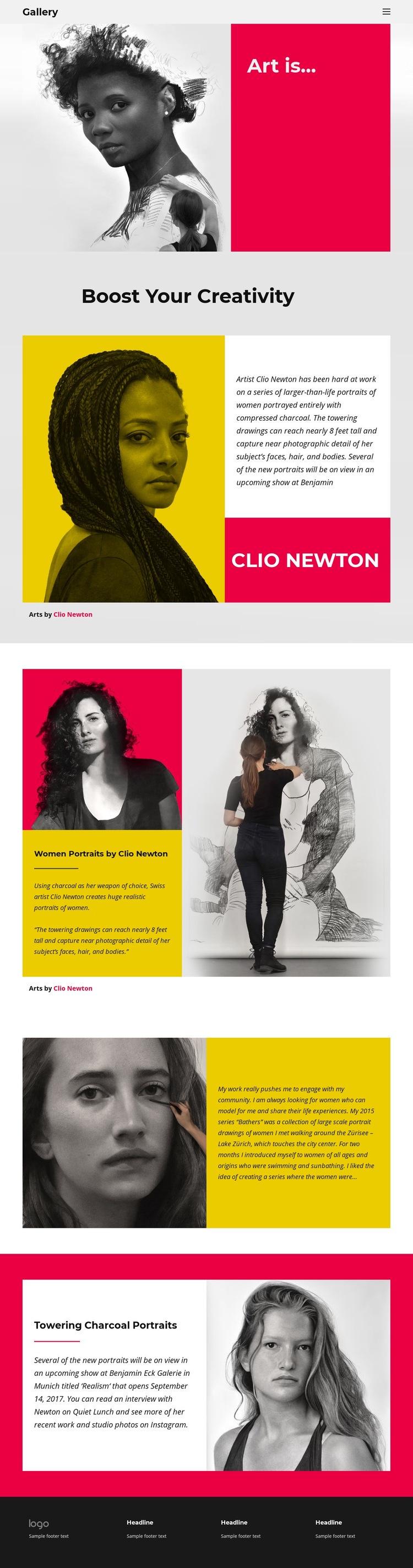
The portfolio separates visual evidence from explanatory content in a way that can accommodate project-specific additions without disturbing the artwork sequence. The opening split pairs a monochrome portrait with the “Art is...” statement, while the next sections place biography and artist-name panels beside portrait imagery. These text-and-image relationships create distinct areas where a project could later introduce an external media component, an artist interview, or another small integration related to the surrounding content.
The Bathers section offers a different kind of extension point. Its close-up portrait sits beside first-person text about modeling, community, and Lake Zürich, so additional functionality would have a clear contextual home near the artist statement rather than being inserted into the image itself. The final “Towering Charcoal Portraits” section likewise divides exhibition information from a large portrait on a vivid background, making it a logical location for project-specific exhibition details or an external event component if required.
The existing navigation, mobile-navigation, repeated split sections, and dark footer provide a stable visual framework for such additions. Custom markup should therefore support a real content need—such as a media embed, event detail, or specialized contact element—while remaining adjacent to the relevant section. The template does not need custom code to explain its core structure; its value here is that the design already identifies where additional functionality could belong.
Customize with Nicepage
Open this ready-made template in the HTML Code Generator and customize it visually in the Nicepage editor. Replace demo content, edit page sections, and adapt the design to your project without rebuilding the template from scratch.
Extend This Page With Custom HTML Code
Insert Code With the HTML Element
Use the HTML Element to add custom code directly to a Block in the Nicepage editor. Enter the required markup in the Code field when the page needs content or functionality that is not available through the standard page elements.
Place the HTML Element in the Layout
Treat the HTML Element as part of the visual page composition. Adjust its position, width, height, alignment, and margins to place the custom content where it belongs alongside text, images, buttons, and other elements. This makes it possible to combine visually edited sections with project-specific code without separating the custom element from the rest of the layout.
Add HTML, CSS, JavaScript, and External Components
The HTML Element supports HTML, CSS, and JavaScript, allowing you to extend the page with custom markup and interactive functionality. It can also be used to embed custom code and third-party components, such as social feeds, advertising code, widgets, or other external functionality required by the project.
This workflow makes the template useful for projects that need a visual page editor together with custom HTML code, JavaScript, embedded components, and functionality beyond the standard page elements.

More from Art & Design Html Code Examples
-
Customize Any TemplateDownload