The hospital future Html Code Example


The Heading and Laboratory Image Define a Clear Extension Boundary
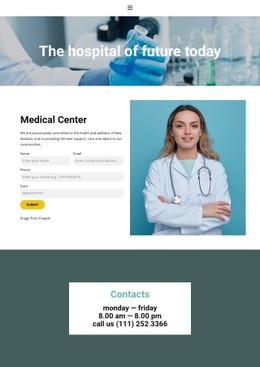
The single heading and image-backed region create a clearly bounded base for optional project-specific additions. The words “The hospital of future today.” already establish the section’s introductory message, while the laboratory glassware and gloved researcher provide the visual context. If a project later needs an external data display, research link, or other custom content, that addition can be positioned around the existing message without replacing the image or changing the section’s primary subject.
The left-aligned title is the most natural reference point for any extension because it defines where visitors first read the block. A custom element placed near the text would need to respect the strong white-on-image contrast and the open photographic field; an addition placed elsewhere could preserve the heading’s prominence while using the laboratory scene as supporting context. The block itself remains static, with no confirmed built-in form, slider, or interactive control to integrate. That makes its extension logic relatively simple: retain the one-message hierarchy, keep the gloved researcher and glassware visible as context, and add functionality only where it supports the healthcare or research introduction. In an HTML Code interpretation, the value lies in extending this specific visual message rather than replacing its focused structure with generic functionality.
Customize with Nicepage
Open this ready-made template in the HTML Code Generator and customize it visually in the Nicepage editor. Replace demo content, edit page sections, and adapt the design to your project without rebuilding the template from scratch.
Edit Template Offline
2. Create a new page or select existing
3. Click Add new block, search for id 2057451 and click enter
Edit Template Online
Create Awesome Websites


Free Nicepage Builder
Keywords
Extend This Block With Custom HTML Code
Add Custom Code Inside or Beside the Section
Use the HTML Element when the block needs project-specific content or functionality that is not provided by its existing elements. The custom element can be placed within the section or near a relevant content region so the added functionality remains connected to the block's purpose.
Position the HTML Element in the Layout
Treat the HTML Element as part of the visual composition. Adjust its position, width, height, alignment, and margins so the custom content fits alongside the block's text, images, buttons, cards, or other elements instead of behaving like a separate page.
Add HTML, CSS, JavaScript, or External Components
The HTML Element supports HTML, CSS, and JavaScript and can be used for custom code and third-party components, including widgets, feeds, advertising code, or other integrations required by a project. Use these capabilities only when the section needs functionality beyond its verified built-in content.
This workflow keeps the original block as the visual/content base while providing a controlled way to extend one section without turning custom code into the primary structure of the whole page.