News about technologies Html Code Example


Edit Template Offline
2. Create new page and search for id 17315
Edit Template Online
Create Awesome Websites


Free Nicepage Builder
Keywords
Product sections create distinct points for functional extensions
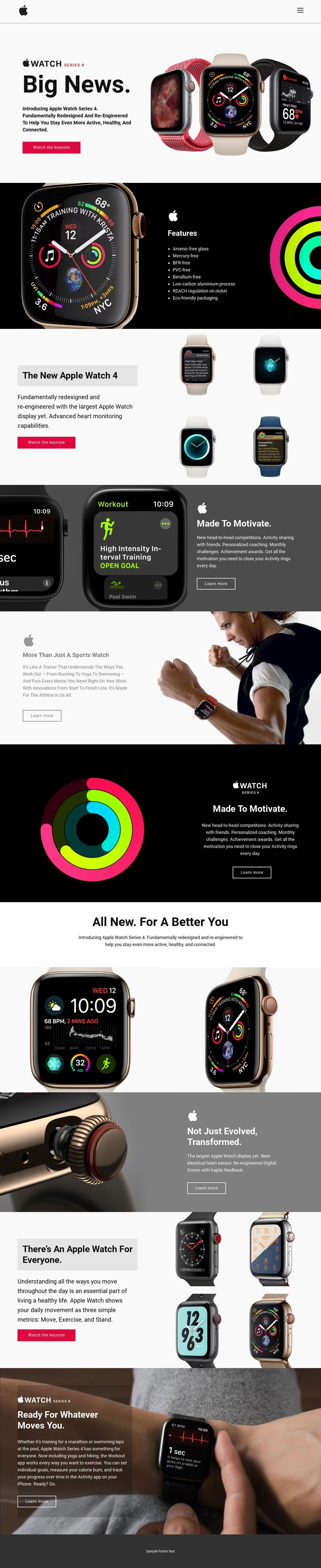
The page already separates its subject into clear content zones: an opening Apple Watch Series 4 introduction, an eight-item environmental feature panel, product image arrangements, activity and workout sections, and a hardware explanation covering the electrical heart sensor and redesigned Digital Crown. Those divisions make it easier to identify where additional functionality could belong without treating the entire page as one undifferentiated block.
The Watch the keynote actions provide one type of extension point, while the repeated Learn more actions support another. A project could keep those visible content relationships intact and place a custom destination, embedded media area, or other project-specific component beside the relevant product explanation when the standard page elements are not enough. The Move, Exercise, and Stand metrics also form a defined data-oriented area, distinct from the lifestyle photography and sports descriptions.
Custom HTML should be considered as an addition to this verified design, not as an existing feature of the template. The page’s split blocks, product grids, dark panels, and image-led sections provide the surrounding visual context that an extension would need to respect. This approach allows added functionality to remain associated with the correct product, workout, or response area instead of forcing a redesign of the entire promotional composition.
Customize with Nicepage
Open this ready-made template in the HTML Code Generator and customize it visually in the Nicepage editor. Replace demo content, edit page sections, and adapt the design to your project without rebuilding the template from scratch.
Extend This Page With Custom HTML Code
Insert Code With the HTML Element
Use the HTML Element to add custom code directly to a Block in the Nicepage editor. Enter the required markup in the Code field when the page needs content or functionality that is not available through the standard page elements.
Place the HTML Element in the Layout
Treat the HTML Element as part of the visual page composition. Adjust its position, width, height, alignment, and margins to place the custom content where it belongs alongside text, images, buttons, and other elements. This makes it possible to combine visually edited sections with project-specific code without separating the custom element from the rest of the layout.
Add HTML, CSS, JavaScript, and External Components
The HTML Element supports HTML, CSS, and JavaScript, allowing you to extend the page with custom markup and interactive functionality. It can also be used to embed custom code and third-party components, such as social feeds, advertising code, widgets, or other external functionality required by the project.
This workflow makes the template useful for projects that need a visual page editor together with custom HTML code, JavaScript, embedded components, and functionality beyond the standard page elements.

More from Technology Html Code Examples
-
Customize Any TemplateDownload