Leader in technology Html Code Example


Edit Template Offline
2. Create new page and search for id 17226
Edit Template Online
Create Awesome Websites


Free Nicepage Builder
Keywords
Product Comparisons Create Clear Places for Additional Code
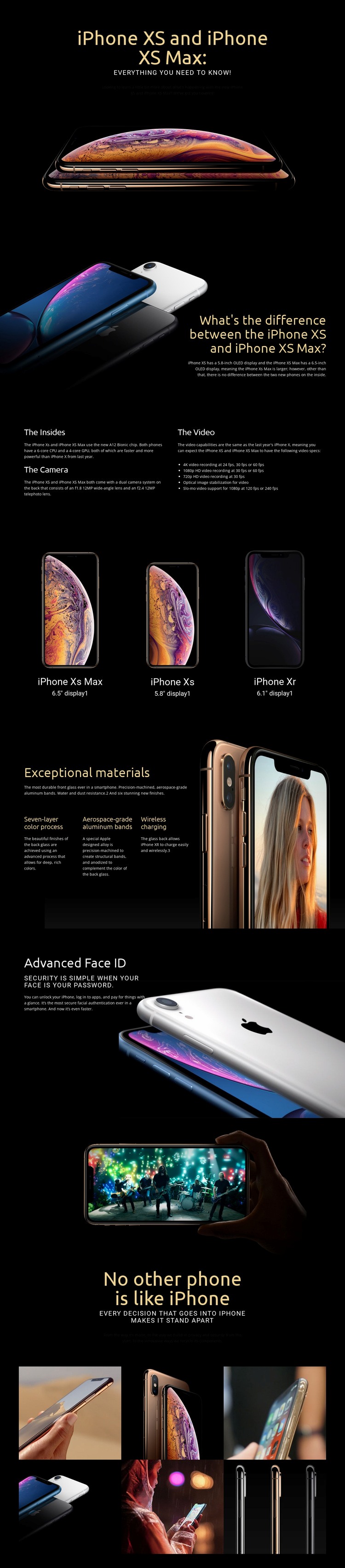
The opening hero, model comparison, and three-item product display already divide the page into clear content zones. The first section introduces iPhone XS and iPhone XS Max over a large product image, while the following comparison explains their display-size difference. The product list then places iPhone XS Max, iPhone XS, and iPhone XR together with their 6.5-inch, 5.8-inch, and 6.1-inch display labels. These relationships provide useful reference points if a project later needs a custom comparison control, product selector, or external information component.
The technical sections create different extension opportunities. “The Insides” groups the A12 Bionic chip, dual camera system, and video capabilities, including 4K, 1080p HD, and 720p recording. The materials section adds seven-layer color processing, aerospace-grade aluminum bands, and wireless charging, while Advanced Face ID isolates security and authentication content. A custom element could sit beside one of these areas when the finished project requires functionality beyond the existing text and images, without replacing the established visual sequence.
Because the page relies on large photography and dark presentation blocks, any added component should preserve the existing contrast, spacing, and image-to-text relationships. Custom markup is therefore most useful as a targeted extension to a specific product or feature area, not as a reason to rebuild the complete page.
Customize with Nicepage
Open this ready-made template in the HTML Code Generator and customize it visually in the Nicepage editor. Replace demo content, edit page sections, and adapt the design to your project without rebuilding the template from scratch.
Extend This Page With Custom HTML Code
Insert Code With the HTML Element
Use the HTML Element to add custom code directly to a Block in the Nicepage editor. Enter the required markup in the Code field when the page needs content or functionality that is not available through the standard page elements.
Place the HTML Element in the Layout
Treat the HTML Element as part of the visual page composition. Adjust its position, width, height, alignment, and margins to place the custom content where it belongs alongside text, images, buttons, and other elements. This makes it possible to combine visually edited sections with project-specific code without separating the custom element from the rest of the layout.
Add HTML, CSS, JavaScript, and External Components
The HTML Element supports HTML, CSS, and JavaScript, allowing you to extend the page with custom markup and interactive functionality. It can also be used to embed custom code and third-party components, such as social feeds, advertising code, widgets, or other external functionality required by the project.
This workflow makes the template useful for projects that need a visual page editor together with custom HTML code, JavaScript, embedded components, and functionality beyond the standard page elements.

More from Technology Html Code Examples
-
Customize Any TemplateDownload