Weekly Class Timetable HTML5 Template


Edit Template Offline
2. Create new page and search for id 6678178
Edit Template Online
Create Awesome Websites


Free Nicepage Builder
Keywords
The Navigation-to-Contact Sequence Creates a Clear Page Hierarchy
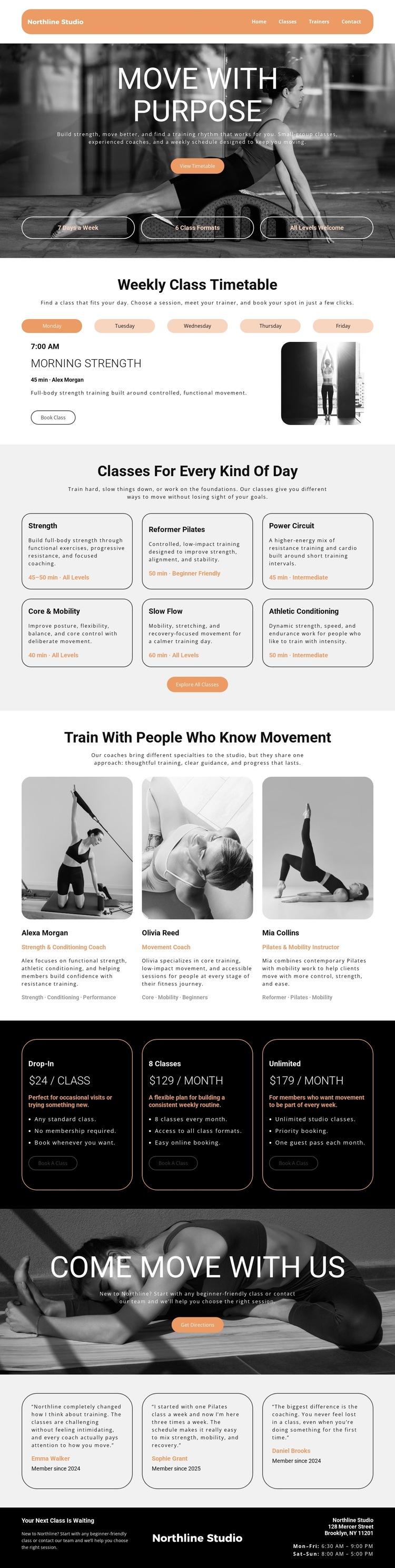
The page begins with a horizontal navigation area containing the Northline Studio identity and links for Home, Classes, Trainers, and Contact. That opening establishes the first level of organization before the hero introduces the “Move With Purpose” message, supporting copy, “View Timetable” button, and three informational badges. The next major group is the weekly timetable, where weekday navigation leads into a class detail row with schedule, trainer, description, image, and booking action.
The middle of the page is divided into recognizable content groups rather than one uninterrupted stream. Six class-category cards form a repeated collection under “Classes For Every Kind Of Day.” Three trainer profile cards then create a separate people-focused group, followed by three dark pricing cards that organize membership and attendance information. The image-led “Come Move With Us” block changes the rhythm before three testimonial cards provide another repeated structure.
The closing contact section returns to Northline Studio and places the address and opening hours in a dark footer. This progression—from navigation, introduction, schedule, categories, trainers, pricing, proof, and contact—gives the page a practical hierarchy for inspecting and managing its parts. The value of the HTML5 structure here is therefore visible in the relationships between major sections and nested repeated content, not in unsupported claims about specific semantic tags or validation.
Customize with Nicepage
Open this ready-made template in the HTML5 Template Builder and customize it visually in the Nicepage editor. Replace demo content, edit page sections, and adapt the design to your project without rebuilding the template from scratch.
Explore This HTML5 Template Structure
Navigate the Page Structure
Customize this ready-made HTML5 template visually in the Nicepage editor while keeping its page organization easy to understand. Use the Layers panel to view the hierarchy of the Header, Blocks, Containers, Elements, and Footer, navigate between different parts of the page, and quickly select items within the layout.
The Layers panel also provides practical controls for working with more complex pages. Blocks, Containers, and Elements can be renamed for easier identification, temporarily hidden while editing, or locked to prevent accidental changes. The outline can also expose the internal structure of elements such as Menus and Contact Forms.
Work With Organized Page Sections
Blocks divide the page into major content sections, while Containers and Elements organize the content inside them. Keeping this hierarchy visible makes it easier to understand how individual parts of the page relate to one another, especially when a layout contains many nested elements.
You can use the Layers panel to move through this structure instead of selecting everything directly on the canvas, making complex layouts easier to inspect and manage as an organized page hierarchy.
Review and Extend the HTML
After customizing the page visually, the resulting HTML can be reviewed and adapted when code-level changes are required. If a project needs additional markup or functionality beyond the standard page elements, use the HTML Element to add targeted custom HTML where necessary.
This workflow combines visual editing with a clear view of the page hierarchy, making the template useful both as a ready-made design and as an HTML5 project whose structure can be inspected, managed, adapted, and extended.