Об атрибутах изображений SRC

galaxy241080
11 Posts
galaxy241080 posted this 28 May 2025
Ask a Question

Здравствуйте! 1.Посмотрел на анализ сайта через google page speed insight. Подскажите пожалуйста, как можно внести атрибуты alt src в изображения контентной части? Декоративные фоновые фото я не трогаю...Как должен быть прописан каждый код отдельного изображения?На странице ПРОЕКТЫ я прописал alt seo изображений.

БЫТЬ МОЖЕТ ВСТАВИТЬ ОБЩИЙ КОД CSS?
.responsive-image {
width: 100%;
max-width: 350px;
height: auto;
}

Мой пример сайта https://memorial-stone.kz/

Last edited 28 May 2025 by galaxy241080

Vote to pay developers attention to this features or issue.
3 Replies
Order By: Standard | Newest
Support Team
Support Team posted this 28 May 2025

Hi,

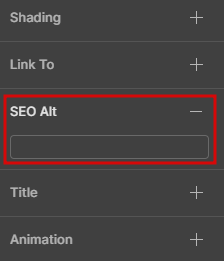
You can add the SEO Alt on the right property panel of the Image Element. Please see the attached screenshot:

enter image description here

Please note that this option is unavailable for the background images, but you can use it for the images in galleries and grids (if images are not background there).

If you mean something else, please attach the screenshot of the message you get from Google PageSpeed Insights.
...................................................
Sincerely,
Paul C.
Nicepage Support Team

Please subscribe to our YouTube channel: http://youtube.com/nicepage?sub_confirmation=1
Follow us on Facebook: http://facebook.com/nicepageapp

galaxy241080
11 Posts
galaxy241080 posted this 28 May 2025

Здравствуйте! ALT SEO где смог там вписал.
Я имею в виду ШИРИНА И ВЫСОТА ИЗОБРАЖЕНИЙ не фоновые изображения, чтобы они определялись в коде
Например, <img src alt width height>

Support Team
Support Team posted this 28 May 2025

Hi,

Thanks for clarifying.

According to the PageSpeed Insights, only one image doesn't have explicit width and height, and this is the icon in the button:

enter image description here

You can set the height and width for it by adding a custom CSS code and check if that helps.
...................................................
Sincerely,
Paul C.
Nicepage Support Team

Please subscribe to our YouTube channel: http://youtube.com/nicepage?sub_confirmation=1
Follow us on Facebook: http://facebook.com/nicepageapp

You must log in or register to leave comments