Template in Joomla not working. I create the article but then when I go to the menu item and change the template the page does not change. It still has the original template. Is there a way to force the menu and article to a particular template.
I just put more time into this and this is what I have found. Any new pages I create in nicepage inside of joomla keep a basic template and they do not allow me to change them from the menu in Joomla. Articles I already created as of a week ago or non-nicepage articles do change when I change the template version in the menu's.
Are others having this issue?
I there another way in joomla to assign the template to an article? I just can't get it to work all of the sudden on these newer pages>
Hi,
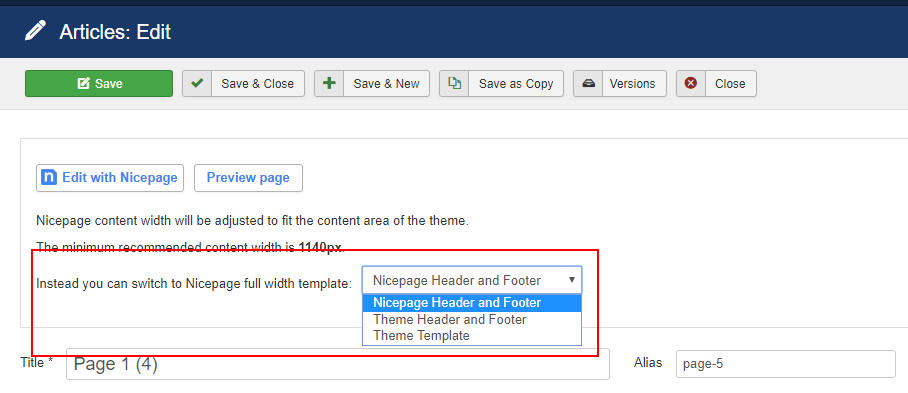
Please check the following option:
If the highlighted template is selected please switch it to any "Theme..." template. This should help.
...................................................
Sincerely,
Olivia
Nicepage Support Team
Please subscribe to our YouTube channel: http://youtube.com/nicepage?sub_confirmation=1
Follow us on Facebook: http://facebook.com/nicepageapp
Hi Ian,
You're welcome. Please let us know if you have any further questions.
...................................................
Sincerely,
Olivia
Nicepage Support Team
Please subscribe to our YouTube channel: http://youtube.com/nicepage?sub_confirmation=1
Follow us on Facebook: http://facebook.com/nicepageapp
Hey, I was just wondering how you get to that screen. I'm in articles:edit but can't seem to find that option.
Hi, Ian.
You can find this option in the list of your Articles.
Content > Articles. After that click on the Article name to see Article Details.
There you will find Nicepage extension options.
Please note that this option is available for the Nicepage pages only.
...................................................
Sincerely,
Negat Veri
Nicepage Support Team
Please subscribe to our YouTube channel: http://youtube.com/nicepage?sub_confirmation=1
Follow us on Facebook: http://facebook.com/nicepageapp
Last edited 17 March 2021 by Support Team
Hi, Ian.
You can find this option in the list of your Articles.
Content > Articles. After that click on the Article name to see Article Details.
There you will find Nicepage extension options.Please note that this option is available for the Nicepage pages only.
...................................................
Sincerely,
Negat Veri
Nicepage Support TeamPlease subscribe to our YouTube channel: http://youtube.com/nicepage?sub_confirmation=1
Follow us on Facebook: http://facebook.com/nicepageapp
Is there any way to set this for pages that are not from nicepage ?
Thanks
Hello Jakub Sitar,
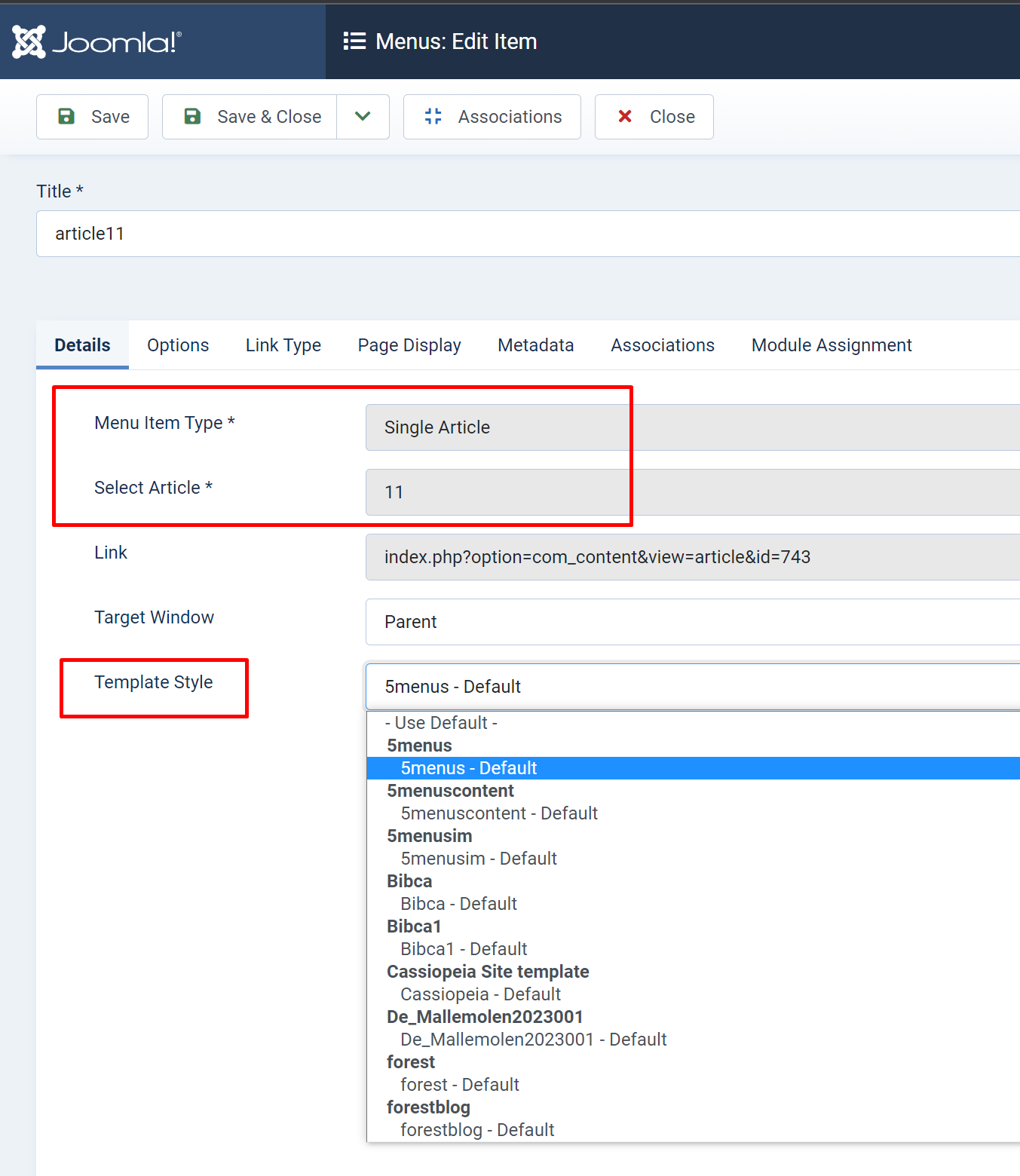
No, Joomla native articles are using the default site's theme.
You can choose a different theme layout for a single article if you add it as a menu item and select another template style:
Please let us know in case you have any other questions.
...................................................
Sincerely,
Anna.
Nicepage Support Team
Please subscribe to our YouTube channel: http://youtube.com/nicepage?sub_confirmation=1
Follow us on Facebook: http://facebook.com/nicepageapp