
Header


Hello ROBERTO,
Thanks for reaching out to us
Currently, you can only add transparency to the images. However, we will add your suggestion to the wish list and forward it to our management.
...................................................
Sincerely,
Ahmad.
Nicepage Support Team
Please subscribe to our YouTube channel: http://youtube.com/nicepage?sub_confirmation=1
Follow us on Facebook: http://facebook.com/nicepageapp
Dear ROBERTO,
As alternatives, you can use the custom CSS code field to control the opacity/transparency and to choose the color 5%,10%, 15% lighter or darker
...................................................
Sincerely,
Ahmad.
Nicepage Support Team
Please subscribe to our YouTube channel: http://youtube.com/nicepage?sub_confirmation=1
Follow us on Facebook: http://facebook.com/nicepageapp
Volevo ringraziarti intanto per la risposta velocissima al mio problema.
Puoi spiegarmi dettagliatamente l'opzione campo codice CSS?
Grazie
Hello ROBERTO,
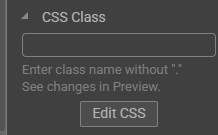
You can use the CSS control and apply the correct custom CSS to rewrite the opasity\transparrency.
You can find the CSS control on the right side after selecting the element you want apply CSS to.
...................................................
Sincerely,
Negat Veri
Nicepage Support Team
Please subscribe to our YouTube channel: http://youtube.com/nicepage?sub_confirmation=1
Follow us on Facebook: http://facebook.com/nicepageapp
vorrei capire che tipo di codice và inserito all'interno del campo css class
ho provato ad inserire il codice di seguito riportato ma non apporta nessuna modifica
background-color: rgba(0, 0, 0, 0.5);
Hello ROBERTO,
Please note that you should write the class name in the place shown on the screenshot above, click edit CSS, and add code there. You will only be able to see changes in the preview.
Please let us know if that helped.
...................................................
Sincerely,
Negat Veri
Nicepage Support Team
Please subscribe to our YouTube channel: http://youtube.com/nicepage?sub_confirmation=1
Follow us on Facebook: http://facebook.com/nicepageapp