Hello
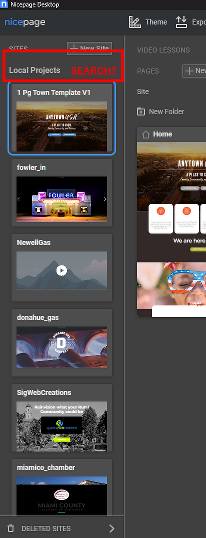
Is it possible to make the local projects searchable? I have many, many websites, and having to scroll through them is very inconvenient and annoying. Please add this to your feature request list.

Thank you!
Hello
Is it possible to make the local projects searchable? I have many, many websites, and having to scroll through them is very inconvenient and annoying. Please add this to your feature request list.
Thank you!
Jim,
Good suggestion. We have added it to our wish list.
...................................................
Sincerely,
Nicepage Support Team
Please subscribe to our YouTube channel: http://youtube.com/nicepage?sub_confirmation=1
Follow us on Facebook: http://facebook.com/nicepageapp
Any update on this feature being included? I hope it's coming soon.
Thanks
Any chance this local project search feature may be coming soon? Or make it possible to change the sorting to alphabetical?
If not, is there a way to side-load local projects? That way I could find or search for the file in my file explorer and load it. Not have to scroll through 70-80 sites every time to find the one I want.
This would be very helpful for my workflow. Thank you!
Any chance this local project search feature may be coming soon? Or make it possible to change the sorting to alphabetical?
If not, is there a way to side-load local projects? That way I could find or search for the file in my file explorer and load it. Not have to scroll through 70-80 sites every time to find the one I want.
This would be very helpful for my workflow. Thank you!
Hi, devs look at upvotes for features, I upvote your now :)
Hello Jim,
Thank you for your feedback! Project search and sorting are on our wishlist, but we don’t have an ETA yet.
We’ve passed your suggestions to our dev team. Your input is appreciated!
...................................................
Sincerely,
George.
Nicepage Support Team
Please subscribe to our YouTube channel: http://youtube.com/nicepage?sub_confirmation=1
Follow us on Facebook: http://facebook.com/nicepageapp
Thanks for your response. I look forward to that feature!
How about the issue of side loading projects? If I can load them somehow from my file explorer, that would give me the searching ability I'm looking for.
Last edited 07 May 2025 by SignatureWeb
Hello Jim,
How about the issue of side loading projects? If I can load them somehow from my file explorer, that would give me the searching
ability I'm looking for.
Just to confirm, did you mean the exported projects saved locally under 'Documents > Nicepage Templates', so you can open them manually instead of scrolling through all sites in the app?
...................................................
Sincerely,
George.
Nicepage Support Team
Please subscribe to our YouTube channel: http://youtube.com/nicepage?sub_confirmation=1
Follow us on Facebook: http://facebook.com/nicepageapp
"so you can open them manually instead of scrolling through all sites in the app?" - Yes.
In the desktop app, the Local Projects sidebar (highlighted in the attached screenshot). I have 70+ projects and growing in that scrolling list. Can I find that project on my hard drive and open it from the file explorer? As opposed to inside the NP app.
The advantage for me being that the files on my hard drive are searchable. Or at least sortable.
Thanks
Hello Jim,
There is one way to search easily.
Please see the screenshots, this is an explanation of NP local projects in documents, but there is no chance to open directly in Nicepage.
And there is a video on how to search fastly and easily the project.
https://drive.google.com/file/d/1MiLHhWClIBaGlefTEieLoItZL4N7KY37/view?usp=sharing
Please let us know the result. Did it work out for you?
...................................................
Sincerely,
George.
Nicepage Support Team
Please subscribe to our YouTube channel: http://youtube.com/nicepage?sub_confirmation=1
Follow us on Facebook: http://facebook.com/nicepageapp
Thank you for your responses on this issue.
Dev Tools would be a great work-around. But I'm not sure how you are launching Dev Tools in the desktop app. As far as I know, Dev Tools only works in a browser. Not in a program or application.
F12 or Ctrl+Shift+I, the typical key combos, do not work.
Last edited 28 May 2025 by SignatureWeb
Hello Jim,
Thank you for your message!
Here is a link, see the information, createdebug.txt file, and then the console will open in the Nicepage Editor, but please do not change anything, only search the projects. (creating a debux text file needs once will be able always open inspect in NP)
https://nicepage.com/doc/90358/provide-error-logs
Please let us know the result.
...................................................
Sincerely,
George.
Nicepage Support Team
Please subscribe to our YouTube channel: http://youtube.com/nicepage?sub_confirmation=1
Follow us on Facebook: http://facebook.com/nicepageapp
Last edited 29 May 2025 by Support Team
Thank you for the further information.
I will try this as soon as I can and let you know the results.
Hello Jim,
You're welcome!
We will be happy to help you at any time.
...................................................
Sincerely,
George.
Nicepage Support Team
Please subscribe to our YouTube channel: http://youtube.com/nicepage?sub_confirmation=1
Follow us on Facebook: http://facebook.com/nicepageapp
I have the same issue as several other people - wanting to be able to quickly locate projects without having to scroll through dozens of projects looking for the right one. It seems obvious that the easiest way to find projects would be to sort by project name. This is unlikely to ever be implemented without a tremendous change in the way Nicepage works. Here's why. Nicepage project source files (unlike the PROJECT files you create yourself) use a generic naming convention (Site_xxxxxxxxx) where the "xxxx..." is just a sequential project number in the Nicepage database. These names have absolutely no connection to your actual project name, and that's the real reason you cannot change the order. From what I can see, the order your projects are presented is based on the "Last Modified" date of the project (most recently accessed project is displayed first). It is possible to build an "external" process that will sort your projects in alphabetical order, but since Nicepage will always display projects in the order of most-recently-accessed, the external process would have to alter the time stamps of the "Site" files to change their order. I am not certain whether Nicepage implements any other control mechanisms to verify the timestamps on the Site files. If they do, then this workaround would not work. If not, then it would be possible to manipulate the time stamps so the Site files would be displayed alphabetically. But, there would be no way to then determine which project files were used most recently. That's probably why Nicepage has not done anything with this request for all this time. Since sorting by name is far more important to me, I plan to create an external sorting mechanism for myself.
As far as making projects "searchable", unless you're referring to a partial search on the project name, I doubt that would be easy to accomplish.
Last edited 5 weeks ago by jack.from.canada
I highly request this feature too. A simple search magnifier where I could enter the project name would be a good start and easy to implement. Best regards
Hi, there
This feature is on our list of possible future updates.
We understand how important it is for you, and we will do our best to implement it in the future. We will update this thread if the feature is released.
Thank you for your understanding.
...................................................
Sincerely,
Edgar L.
Nicepage Support Team
Please subscribe to our YouTube channel: http://youtube.com/nicepage?sub_confirmation=1
Follow us on Facebook: http://facebook.com/nicepageapp
Glad to know that you are still considering it.
The suggestion you gave me for using Dev Tools worked for a little while. But it no longer works.
Not sure if something changed or what.
Hello Jim Jenness
Please create a new Separate Case and ask your question in there.
For better understanding and clarification, maybe we will need your private details, project details, credentials, etc.
We may need that case to be private. We will try our best to help you.
...................................................
Sincerely,
George.
Nicepage Support Team
Please subscribe to our YouTube channel: http://youtube.com/nicepage?sub_confirmation=1
Follow us on Facebook: http://facebook.com/nicepageapp