
How to disable Leads?


Leads are always generated, and accessible at https://nicepage.com/User/Leads. You can add the URL and use this submission option together with leads.
...................................................
Sincerely,
Alan R.
Nicepage Support Team
Please subscribe to our YouTube channel: http://youtube.com/nicepage?sub_confirmation=1
Follow us on Facebook: http://facebook.com/nicepageapp
But how to disable them - I'm writing a code for mu client and I don't wont to receive his data
Hello,
After you add URL as Submit option, you need to delete Email and Leads will be deleted too. You will have only URL as Single Use Submit to option:
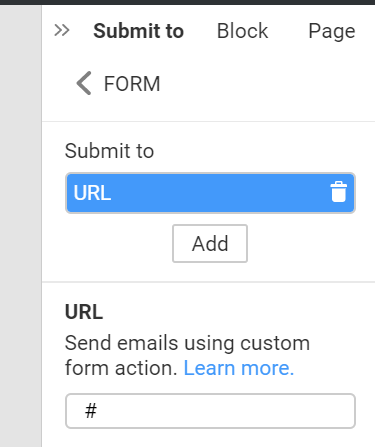
Please check, do you have the same in your form settings?
If not, we might need your project. What application are you using to build your site with Nicepage?
...................................................
Sincerely,
Anna T
Nicepage Support Team
Please subscribe to our YouTube channel: http://youtube.com/nicepage?sub_confirmation=1
Follow us on Facebook: http://facebook.com/nicepageapp

But how to disable them - I'm writing a code for mu client and I don't wont to receive his data
Send with PHP-Script, delete Leads from List
Dont forget to fill the Fields and your server must be able to send Emails.

Leads are always generated, and accessible at https://nicepage.com/User/Leads. You can add the URL and use this submission option together with leads.
...................................................
Okay leads are always generated and accessible...
But in some countries, access, rectification or deletion are legals obligations.
If this option is not offered the forms generated by nicepage are not usable in some European countries I think.
In France for example.

Leads are always generated, and accessible at https://nicepage.com/User/Leads. You can add the URL and use this submission option together with leads.
...................................................
Okay leads are always generated and accessible...
But in some countries, access, rectification or deletion are legals obligations.
If this option is not offered the forms generated by nicepage are not usable in some European countries I think.
In France for example.
Yes, Nicepage is nice but I wonder how they take their decissions.

Leads are always generated, and accessible at https://nicepage.com/User/Leads. You can add the URL and use this submission option together with leads.
THIS IS NONSENSE!
For example I bulid a website for a client, and I have NOT to know anything about their leads! But I will, as the "leads" option in forms can not be deleted!!! THIS IS AN ENORMOUS VIOLATION OF GDPR, just to mention only one!!!
YOU SHOLD ENABLE DELETION OF THE "LEADS" OPTION ASAP!!!
Last edited 17 March 2025 by GIME
As for now, the Email option remains as it is without any option to customize. The link is closed and can only be opened by the site administrator, you, as the site creator.
Initially, the Email option is for a registered user with a license. Sure, you can change the email to receive the form submissions but cannot separate it from the administrator's account. The monthly form submissions counter per site is used for this type of form submission.
If you do not want your licensed email to be used, you can use another submit option. For sites created as further export to HTML, there are URL or Mailchimp options, as well as Send email with PHP script.
If you sell the theme, it shouldn't be hosted under your account, your client should use his/her own license to verify email.
...................................................
Sincerely,
Anna.
Nicepage Support Team
Please subscribe to our YouTube channel: http://youtube.com/nicepage?sub_confirmation=1
Follow us on Facebook: http://facebook.com/nicepageapp