Hi Sean,
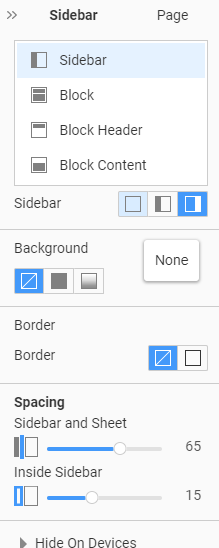
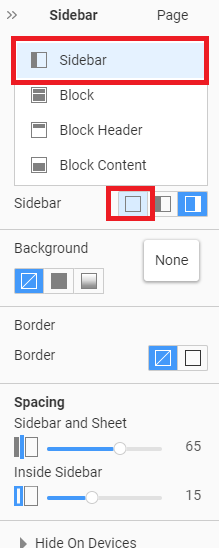
Please open your Desktop Project >> Theme tab >> Sidebar and choose Sidebar None:
...................................................
Sincerely,
Susanna I.
Nicepage Support Team
Please subscribe to our YouTube channel: http://youtube.com/nicepage?sub_confirmation=1
Follow us on Facebook: http://facebook.com/nicepageapp
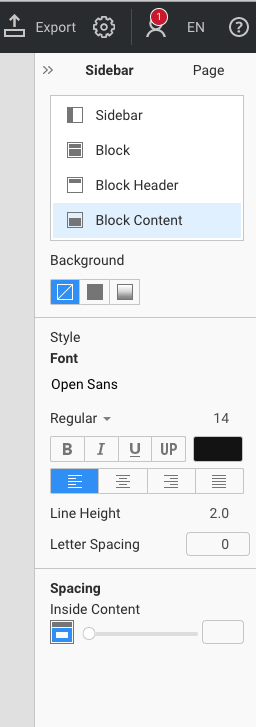
Hello Susanna, thank for the reply - but there is no 'none' button as per the screenshot attached.
Do you think perhaps my desktop version has a bug? I'm working on a Mac and Version 3.3.3.
Hi Sean,
You are in the Block content section. Please select Sidebar:
...................................................
Sincerely,
Susanna I.
Nicepage Support Team
Please subscribe to our YouTube channel: http://youtube.com/nicepage?sub_confirmation=1
Follow us on Facebook: http://facebook.com/nicepageapp
So easy and how embarrassing. Got it - thank you Susanna!!! :)
Sean,
You are welcome:)
Feel free to contact us with any other questions you may have.
...................................................
Sincerely,
Susanna I.
Nicepage Support Team
Please subscribe to our YouTube channel: http://youtube.com/nicepage?sub_confirmation=1
Follow us on Facebook: http://facebook.com/nicepageapp
Hello, I have followed all of the steps in this forum but as soon as I select 'none' and go back to the page the sidebar is still there!!!!! I have tried several times and it is extremely frustrating. It is only on a single page as well but there is no way for myself to remove it. Please help or fix this bug.
Nicepage appeared great from the outside but has caused more headaches than it's worth so far.
Hello Chad702,
Kindly create a separate private ticket with your Project file attached so we can look into the issue.
Please subscribe to our YouTube channel: http://youtube.com/nicepage?sub_confirmation=1
Follow us on Facebook: http://facebook.com/nicepageapp