
Pages not saving


Hi Richard,
Do you mean that you work in the online editor on nicepage.com or that happens on your site with the plug-in? If that is your site with the plug-in please contact your hosting provider and ask them to check if something is blocking the saving process. That may be server security settings and also the limitations on the request size and time.
...................................................
Sincerely,
Hella
Nicepage Support Team
Please subscribe to our YouTube channel: http://youtube.com/nicepage?sub_confirmation=1
Follow us on Facebook: http://facebook.com/nicepageapp

Hi,
I have a problem with online Nice page plugin in Word Press. When I edit page in Nice page plugin and push PUBLISH button usually I get message "Page was published" and all is ok. But today, after pushing PUBLISH button, yellow word SAVING appeared, but nothing happened. When I was trying to exit Nice page editor message appeared "Changes that you made may not be saved" and I lost all changes. I don˙t get any error massage.
In attachment I put screenshot of what is going on. Hope you can help me because I love Nice page.
Thanks in advance,
Alan
P.S. as you can see in screenshot yellow word SAVING appear and below blue line goes forever and nothing happens.

Last edited 14 May 2021 by papayo2
Hello Alan,
Thank you for using Nicepage!
Kindly, create a new private topic describing this issue with provided temporary access to your admin panel so we can inspect the problem.
...................................................
Sincerely,
Lilioneta
Nicepage Support Team
Please subscribe to our YouTube channel: http://youtube.com/nicepage?sub_confirmation=1
Follow us on Facebook: http://facebook.com/nicepageapp

Hello mjawadhussain,
Kindly, create a new private topic describing this issue in details.
...................................................
Sincerely,
Lilioneta
Nicepage Support Team
Please subscribe to our YouTube channel: http://youtube.com/nicepage?sub_confirmation=1
Follow us on Facebook: http://facebook.com/nicepageapp

Hi I have same issue after latest update today
Last edited 16 August 2021 by Keriko
Hi,
Please try to disable (temporarily) third-party plugins or update them to the most recent version.
Some plugins can affect the saving process in Nicepage.
Also, the problem сan be on the server-side. Please contact your hosting provider and ask them to check this problem.
If that doesn't help, please create a private case https://nicepage.com/Forum/Topic/Create and provide temporary access to the CMS admin panel, specify how we can reproduce the issue on your side.
...................................................
Sincerely,
Susanna I.
Nicepage Support Team
Please subscribe to our YouTube channel: http://youtube.com/nicepage?sub_confirmation=1
Follow us on Facebook: http://facebook.com/nicepageapp

that's no help at all support team, suddenly everyone's servers are breaking down? clearly it's an error on your side, please fix it :)
Hi,
Please try to disable (temporarily) third-party plugins or update them to the most recent version.
Some plugins can affect the saving process in Nicepage.Also, the problem сan be on the server-side. Please contact your hosting provider and ask them to check this problem.
If that doesn't help, please create a private case https://nicepage.com/Forum/Topic/Create and provide temporary access to the CMS admin panel, specify how we can reproduce the issue on your side.
...................................................
Sincerely,
Susanna I.
Nicepage Support TeamPlease subscribe to our YouTube channel: http://youtube.com/nicepage?sub_confirmation=1
Follow us on Facebook: http://facebook.com/nicepageapp
Hello Kim,
I've answered your ticket. Kindly, let's continue our conversation there.
...................................................
Sincerely,
Lilioneta
Nicepage Support Team
Please subscribe to our YouTube channel: http://youtube.com/nicepage?sub_confirmation=1
Follow us on Facebook: http://facebook.com/nicepageapp

how did you resolved your issue ? actually i have going through similar thing.
Last edited 23 September 2021 by Lilioneta
Hi crossvid,
In this case, kindly create a separate ticket with the description of the issue so we can assist you.
...................................................
Sincerely,
Lilioneta
Nicepage Support Team
Please subscribe to our YouTube channel: http://youtube.com/nicepage?sub_confirmation=1
Follow us on Facebook: http://facebook.com/nicepageapp

I have the same problem - pages appear to say saved - but when I try and exit I get the message I have to save or page will be cancelled. This is clearly a NP problem as we are all getting it. Can you publish the fix here on this thread - so I dont have to go through the tedious task of creating a seperate ticket. Thanks
Using WP latest version, PHP 7.4 , W3Total Cache and Yoast plugins (all fairly standard stuff)
I should add the ONLY work around this is to publish the page - this then saves it completely - but then go page into pages - quick edit and set it to draft again - until ready to make the page live
Last edited 23 November 2021 by voodoo
Hello voodoo,
Kindly create a separate ticket with the description of the issue that you're having and we'll gladly assist.
...................................................
Sincerely,
Lilioneta
Nicepage Support Team
Please subscribe to our YouTube channel: http://youtube.com/nicepage?sub_confirmation=1
Follow us on Facebook: http://facebook.com/nicepageapp

Pages not saving. I try to save the page and not saving. I get the message HTTP status error 503, or 507.
I try from chrome and Edge, but the same thing. I am very disappointed, I have spent too many hours on something that is so simple
Hi gekoum2,
Kindly create a separate ticket with the description of the issue that you're having and we'll gladly assist.
...................................................
Sincerely,
Lilioneta
Nicepage Support Team
Please subscribe to our YouTube channel: http://youtube.com/nicepage?sub_confirmation=1
Follow us on Facebook: http://facebook.com/nicepageapp

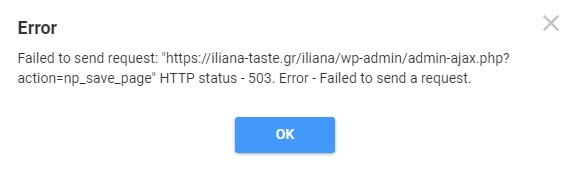
I ran into this problem over the weekend. For me, the plugin version did not match the version of my nicepage theme. After a software update of the desktop program and a fresh export/import of my theme into Wordpress, the issue was resolved.