


What's New
- New Video: Menu Demo
- New Language Translations for the Nicepage User Interface
- New Container Options
- New Site Designs
- Bug Fixes and New Features

New Demo Video: How to use the Menu
 Menu in Nicepage Menu in Nicepage |
How to use the Menu in NicepageWe get many requests on how to export a project with the Menu, and then to make it work in WordPress or Joomla. This demo shows how to do that in Nicepage, and that is done easily. |
|
 Importing to WordPress Importing to WordPress |
Importing the Menu to WordPressThis video explains how to export a theme with the Menu created in Nicepage, and then import it into WordPress. |
|
 Importing to Joomla Importing to Joomla |
Importing the Menu to JoomlaThis video explains how to export a theme with the Menu created in Nicepage, and then import it into Joomla. |
|
Subscribe our YouTube channel so you do not miss our new videos.
New Language Translations are now available
Added: Italian, Spanish, and Nederlands translations for the Nicepage User Interface

Feature Videos
Container Paddings and Text Box Top Margins
Multi-Select
New Features and Bug Fixes
- Container Paddings

- Top Margin for the Text Box

- Support for the Section Height in numerical values . CSS units like vh, vw are now supported.
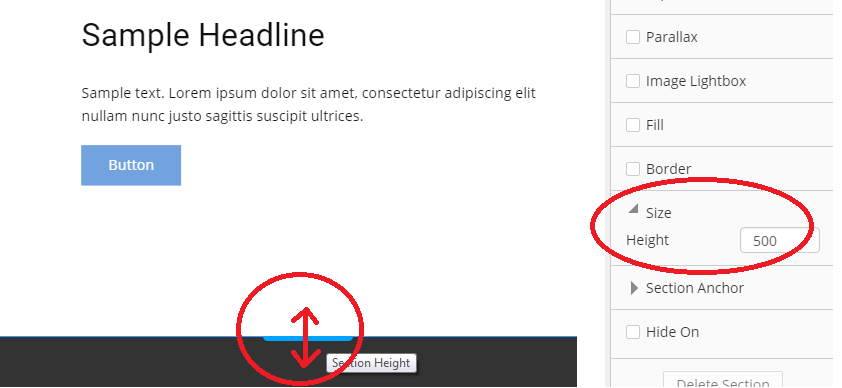
- Image Background for the Page

- Integration of Billion Photos
Upcoming Features: Size Selection, and Download/Apply Feature

- Left Panel: Added the Right-Click Context Menu

Improvements for the Export Dialog :
- You can now choose the way you export your project: as a ZIP file or as a FOLDER with files;
- Simplified the Export Options

- Project Folder

- Favicon Property is now available

- Added the support for the Edge Browser in the Preview option

- Fixed the issue with the Three-Column Grid Layout in the Tablet Mode

- Menu: Fixed the problem with the Responsive Menu;
- Video: Fixed the issue with playing videos on the iPhone;
- Video: Fixed the issue with the Autoplay. Now the Mute is enabled by default, so videos can play automatically.
WordPress/Joomla
- Fixed the Image Renaming issue. Now images have the same name as uploaded;
- Fixed the Joomla Extension 500 Error;
- Fixed the bug with showing the Metadata from databases;
Fixed the problem with cutting of long paragraphs in the Blog Templates;
Page Preview for Joomla
![joomla-preview-page.png]()
Joomla: Fixed the issue with the Blank Preview;
- Joomla: Fixed the issue with imported menus;
The compatibility with the Jetpack Extension is fixed.
Added the Security Warning
This warning is shown if the website and its Administration part use different protocols (http, https):
![security-warning.png]()


New Site Designs
Continued adding many new site designs every day!
Follow us on Facebook to see what happens every day!


Last edited 05 December 2018 by Support Team


